
Shipping protection
Auto-fulfill and tag protected orders
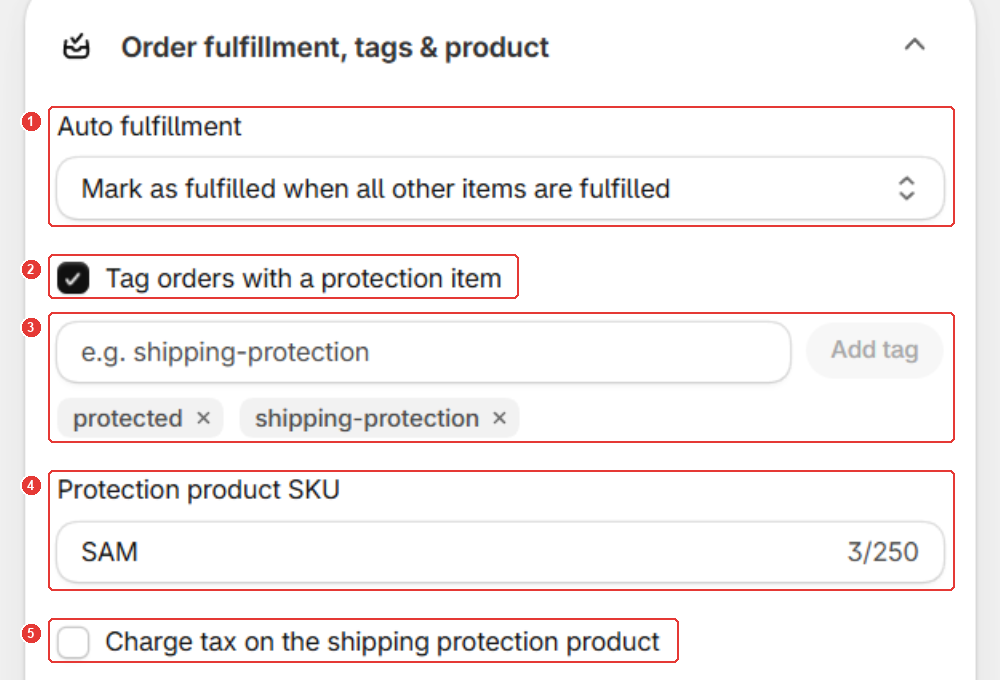
Open Protection, then Order fulfillment, tags & product under Rules. Choose when Sam marks protection as fulfilled, and add up to 10 tags for new protected orders. Both, and the SKU, need Standard or Plus; Charge tax works on every plan. Click Save.
Protection is an item in the order that never ships, so the order stays partly unfulfilled until someone marks it fulfilled. Sam can do that for you, and tag protected orders so you can filter them.
Plan: auto fulfillment, order tags and the SKU need Standard or Plus. See Plans and the Starter order limit.
How do you turn on auto-fulfill and tags?
- In the app menu, click Protection. Under Rules, open Order fulfillment, tags & product.
- Under Auto fulfillment (1), choose when Sam marks protection as fulfilled:
- Mark as fulfilled when the first item is fulfilled
- Mark as fulfilled when all other items are fulfilled
- Mark as fulfilled immediately after purchase (once the order is paid)
- Tick Tag orders with a protection item (2). Type a tag, for example
shipping-protection, and click Add tag (3). Repeat for up to 10 tags. - Click Save in the save bar.
Use the tags to filter your Shopify orders list, or see protected orders in the app under Protected orders.
How do you set the SKU and tax?
- In Protection product SKU (4), type a SKU. It’s
SAMby default. - Tick Charge tax on the shipping protection product (5) to charge tax on the fee. It’s off by default.
- Click Save.
What if you use a 3PL?
If a fulfillment service (3PL) holds the protection product, Sam shows Allow location access to auto-fulfill protection.
- Click Grant location access (1) and approve the permission.
- Make sure the protection product is available at one of your own locations.
Your other products and order routing stay the same.
Good to know
- Only new orders get tags. Orders placed before you saved aren’t tagged.
- Other rules in the same section: see Hide the widget from some customers or carts.
Frequently asked questions
Are my existing orders tagged when I turn on order tags?
No. Only orders placed after you save get the tags. Tags already on an order stay.
When does immediately after purchase fulfill protection?
When the order is paid. Cash on delivery and other unpaid orders wait until payment is captured.
Can I use these settings on the Starter plan?
Charge tax works on every plan. Auto fulfillment, order tags and the SKU need Standard or Plus.
Still need help?
Our developers answer support themselves. Chat with us or email [email protected].