

Sam Shipping Protection guide · Get started
Set the protection price and widget text
In short
Open Protection Settings > Config. Under Insurance pricing choose Fixed or Percentage and enter the amount, or tick Set custom price by cart value for price tiers. Edit the widget title, description and buttons under Content, check the live preview, then click Save.
Everything about price and wording lives on Protection Settings, on the Config tab. The preview on the right updates as you type, so you can see the widget before you save.
Step 1: Choose how to price protection
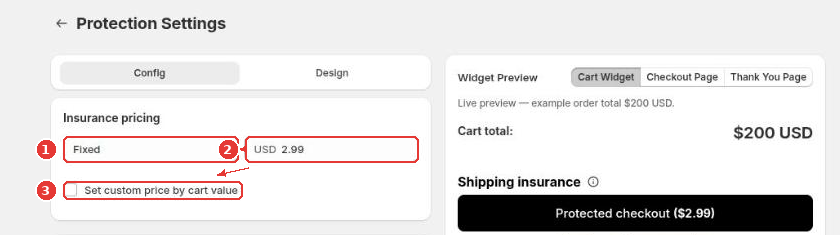
- Choose the pricing type (1): Fixed charges the same amount on every order, Percentage charges a share of the cart total. With a percentage you can also set a minimum and maximum price.
- Enter the amount (2).
- To charge different prices for different cart values, tick Set custom price by cart value (3) and add one tier per cart range. Make sure the tiers cover every cart total with no gaps; the app warns you if a range is left out.
Step 2: Edit the widget text
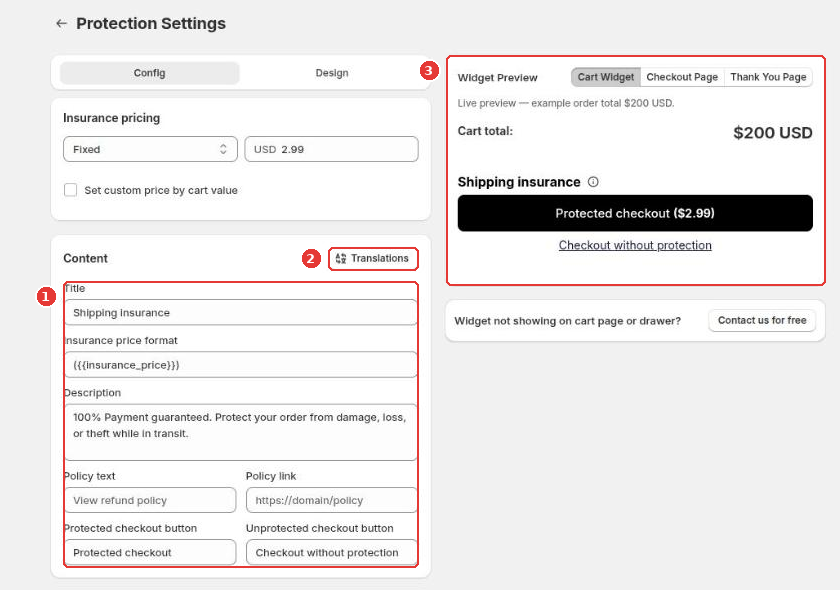
Under Content (1) you can change the title, how the price is shown, the description, the policy link and the labels of the two buttons. Use Translations (2) to add the same text in your other store languages. The Widget Preview (3) shows the result.
Keep the wording clear: say what protection covers and link to your policy. If you call it “insurance” on your store, make sure that matches how you actually handle claims, since Sam does not underwrite coverage.
Step 3: Save
Click Save in the bar at the top of the page. Then open your store, add a product to the cart and check the widget.
Next: choose the widget design or set visibility and exclusions.
Frequently asked questions
Should I use a fixed fee or a percentage?
A fixed fee is simple and works well when your order values are similar. A percentage keeps the fee in line with the order value, and you can set a minimum and maximum price so small and large carts stay sensible.
Do I keep the protection fee?
Yes. The fee is paid to your store like any other product in the order. Sam never takes a share of it; you pay only your app plan.
Still need help?
Our developers answer support themselves. Chat with us or email [email protected].