

Sam Shipping Protection guide · Claims
Claim emails and translations
In short
On the Claims page, Email Template turns on emails that tell you and the customer when a claim is filed, refunded, reordered or cancelled; set up each template before turning it on. Translations lets you translate the claim form and status messages for each store language.
Both settings open from the buttons at the top of the Claims page.
Claim emails
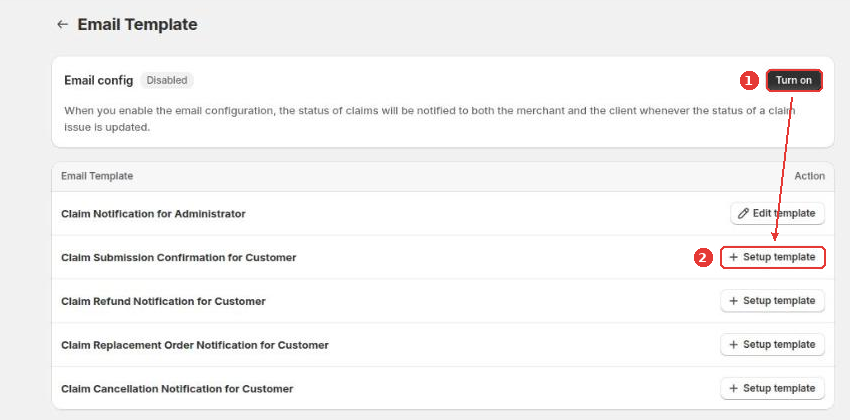
Click Email Template. Set up each template you want to send (2), then click Turn on (1). From then on, the app emails you and the customer whenever a claim’s status changes.
The templates are:
- Claim notification for administrator (new claims for you)
- Claim submission confirmation for customer
- Claim refund notification for customer
- Claim replacement order notification for customer
- Claim cancellation notification for customer
While emails are off, claims you create in the app don’t notify the customer.
Translations
Click Translations to see your store languages. Click Translate (1) next to a language to translate the claim form and the claim status messages your customers see.
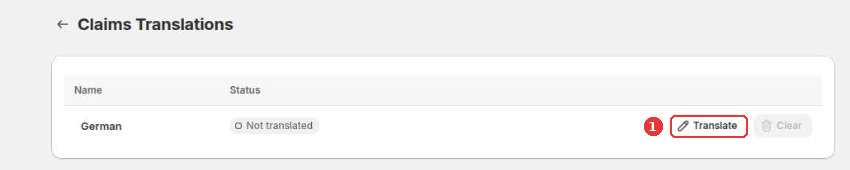
The list shows the other languages of your store. To add a language, publish it first in Settings > Languages.
Still need help?
Our developers answer support themselves. Chat with us or email [email protected].