

Sam Shipping Protection guide · More features
See protected orders and protection revenue
In short
Protected Orders lists every order with shipping protection, its fulfillment status, order amount and protection amount. Filter by source (cart, checkout or thank-you page) and by date. The app home shows protection sales for the selected period.
Open Protected Orders in the app menu to see every order that includes shipping protection.
- Source (1) filters by where the customer added protection: cart, checkout or thank-you page.
- The date picker (2) sets the period.
- The Source column (3) shows where each order’s protection came from, which tells you which widget earns the most.
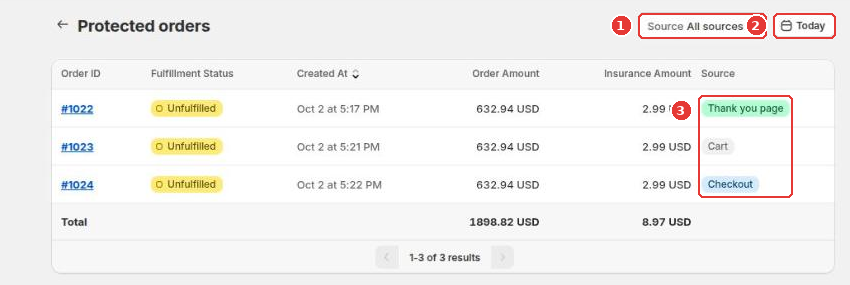
Click an order number to open the order in Shopify. The Total row adds up order and protection amounts for the filtered list.
The app home also has a sales card with protected orders and protection revenue for the last 30 days or a period you choose.
Still need help?
Our developers answer support themselves. Chat with us or email [email protected].