

Claims
Create a claim for a customer
On the Claims page, click Add claim. Search for the protected order by order number or the customer's email, enter the reason, pick a status and click Create claim. Tick Email the customer first if you want Sam to send the claim emails.
Open a claim for a customer who contacts you by email, chat or phone instead of using your claim portal. It works for orders that haven’t shipped yet, too.
How do you create the claim?
- On the Claims page, click Add claim (1).
- In Find a protected order, type an order number or the customer’s email and click Search (2).
- Pick the order.
- Enter the Reason (3).
- If you have photos, add them under Photos (optional).
- Pick a Status: Requested or In Progress.
- To let Sam email the customer and you about the new claim, tick Email the customer (4).
- Click Create claim (5).
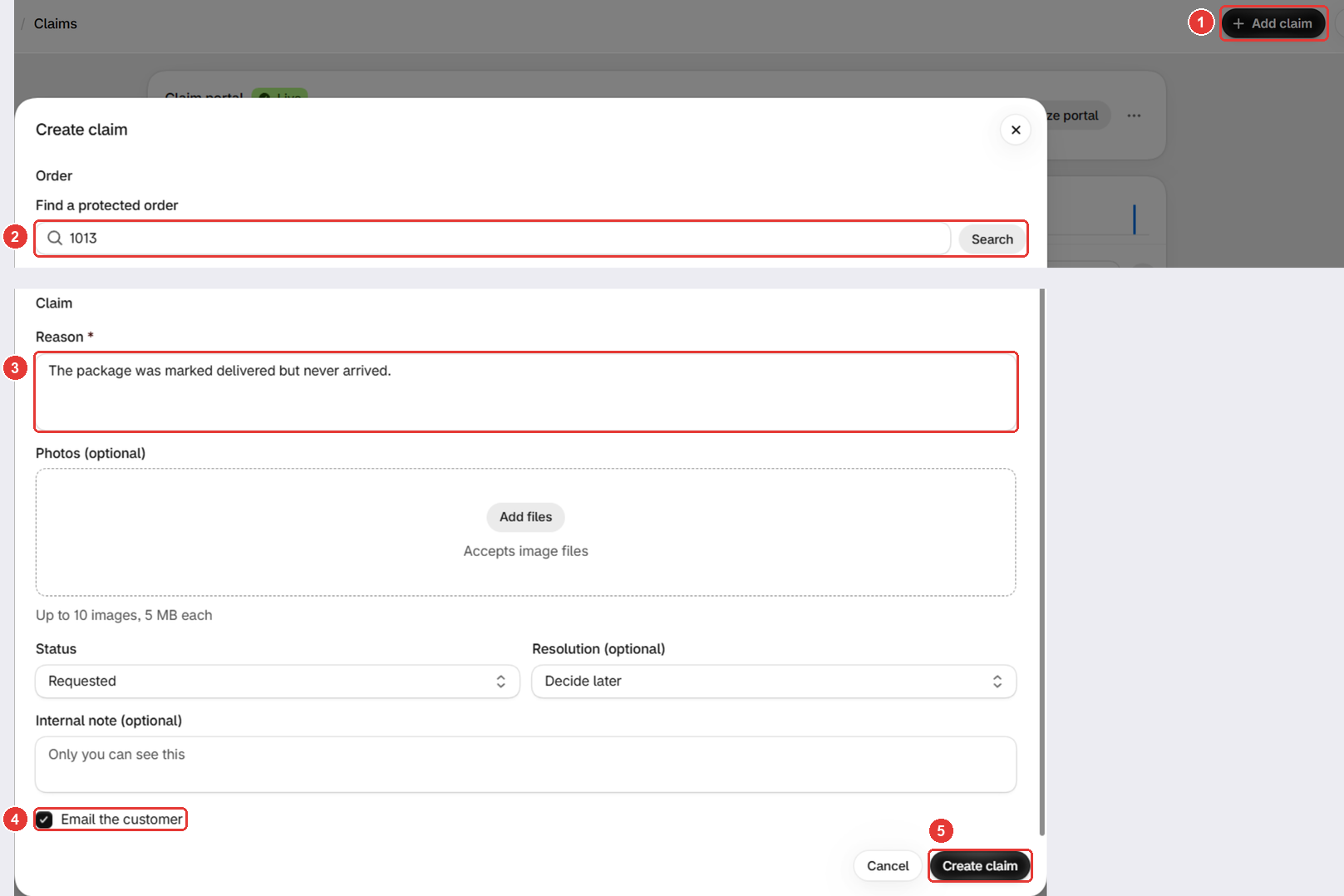
The claim shows in the list right away. Open it to refund, issue store credit, reorder or cancel.
Email the customer needs a plan that includes claim emails, with the emails turned on. See Turn on claim emails.
Why can’t you find the order?
The search only shows protected orders that don’t have a claim yet. Check two things:
- Does it already have a claim? Look it up on the Claims page.
- Does it have protection? Check it on Protected orders.
Good to know
- Resolution (optional) is only a label. It doesn’t refund or reorder anything.
- Internal note (optional) is for you only.
Frequently asked questions
Can I create a claim for an order that hasn't shipped?
Yes. Unlike the claim portal, Add claim works for orders that aren't fulfilled yet.
Why can't I find the order in the search?
The search only shows protected orders that don't have a claim yet. Check the Claims page for an existing claim, and the Protected orders page for protection.
Why is Email the customer greyed out?
Your plan doesn't include claim emails, or both Claim received and New claim (admin) are off in Settings > Notifications.
Still need help?
Our developers answer support themselves. Chat with us or email [email protected].