Install Sam free

★ 4.9 (107 reviews) Built for Shopify Free plan available

Sam FOMO · Sales pop up app for Shopify

Sales pop-ups and social proof from your real store data

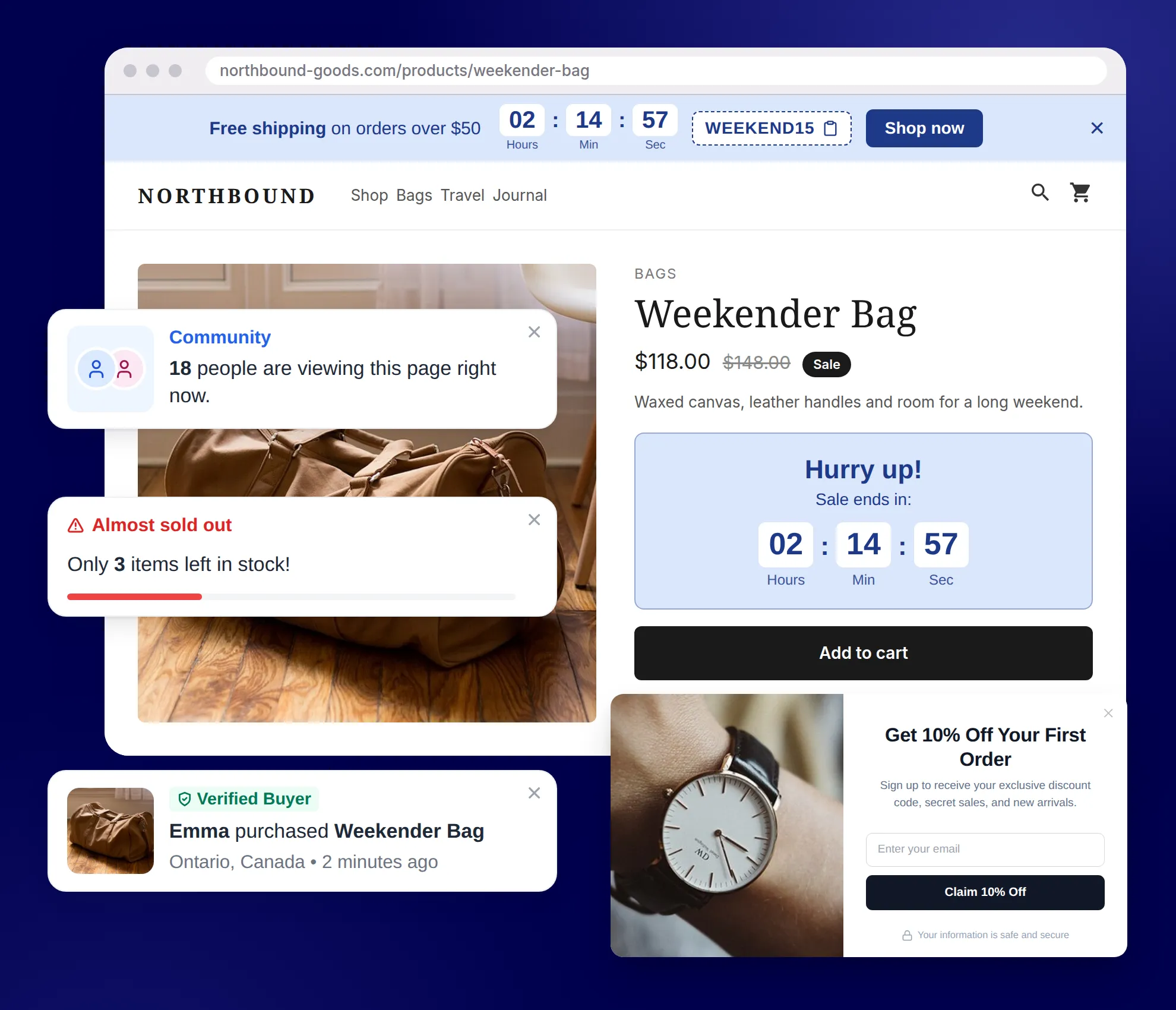
Show real recent orders, live visitors and low stock, add countdown timers and a promo bar, and collect emails with a discount pop-up. Free to install, no code.

Install free on Shopify

★ 4.6 (17 reviews) Built for Shopify Free plan available

What is Sam FOMO?

Sam FOMO is a sales pop-up and social proof app for Shopify, made by ShopWil. It shows shoppers real activity from your store: recent orders, live visitor counts, sold counts, low stock alerts, add-to-cart activity and product reviews from Judge.me or Shopify. It also adds countdown timers, a promo bar at the top or bottom of every page, and email pop-ups with a discount code. Every number comes from your own orders, sessions and inventory, and pop-ups take your theme’s look and the shopper’s language. Sam FOMO is free to install, Built for Shopify, and rated 4.6★ from 17 reviews on the Shopify App Store since its launch in August 2025.

4.6★ Shopify App Store rating 17 reviews, Oct 2026
11 Notification types Plus email pop-ups
13 Storefront languages Built-in text, times and prices
Free To install Built for Shopify

How it works

How does Sam FOMO work?

  1. 1

    Install and turn on the app embed

    Install Sam FOMO, click Enable in the setup guide and save your theme. No code to edit.

    Read the guide →
  2. 2

    Create a notification

    Pick a type, such as Recent Sales or Low Stock Alert. The editor opens with ready-to-use defaults.

    Read the guide →
  3. 3

    Fine-tune and measure

    Set the design, placement and timing, then check impressions, clicks and CTR in Analytics.

    Read the guide →
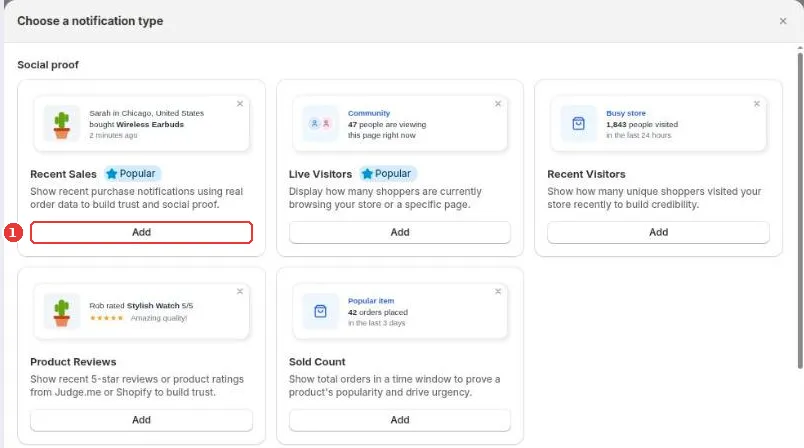
Sam FOMO admin, Choose a notification type dialog: Recent Sales, Live Visitors, Recent Visitors, Product Reviews and Sold Count cards with Add buttons
Creating a notification in the Sam FOMO admin (demo store).

Features

What can you show with Sam FOMO?

Every pop-up below is drawn by the app’s own storefront code, with the default text merchants start from.

Recent Sales

Show real orders as they happen

A small card shows who bought what, where and when, built from your paid Shopify orders or a CSV of real sales.

  • Write the message with variables: first name, city, country, flag, product, price and time
  • Show all recent orders, the last 7 or 30 days, or a date range
  • Exclude orders by tag and hide test orders
Set up Recent Sales →
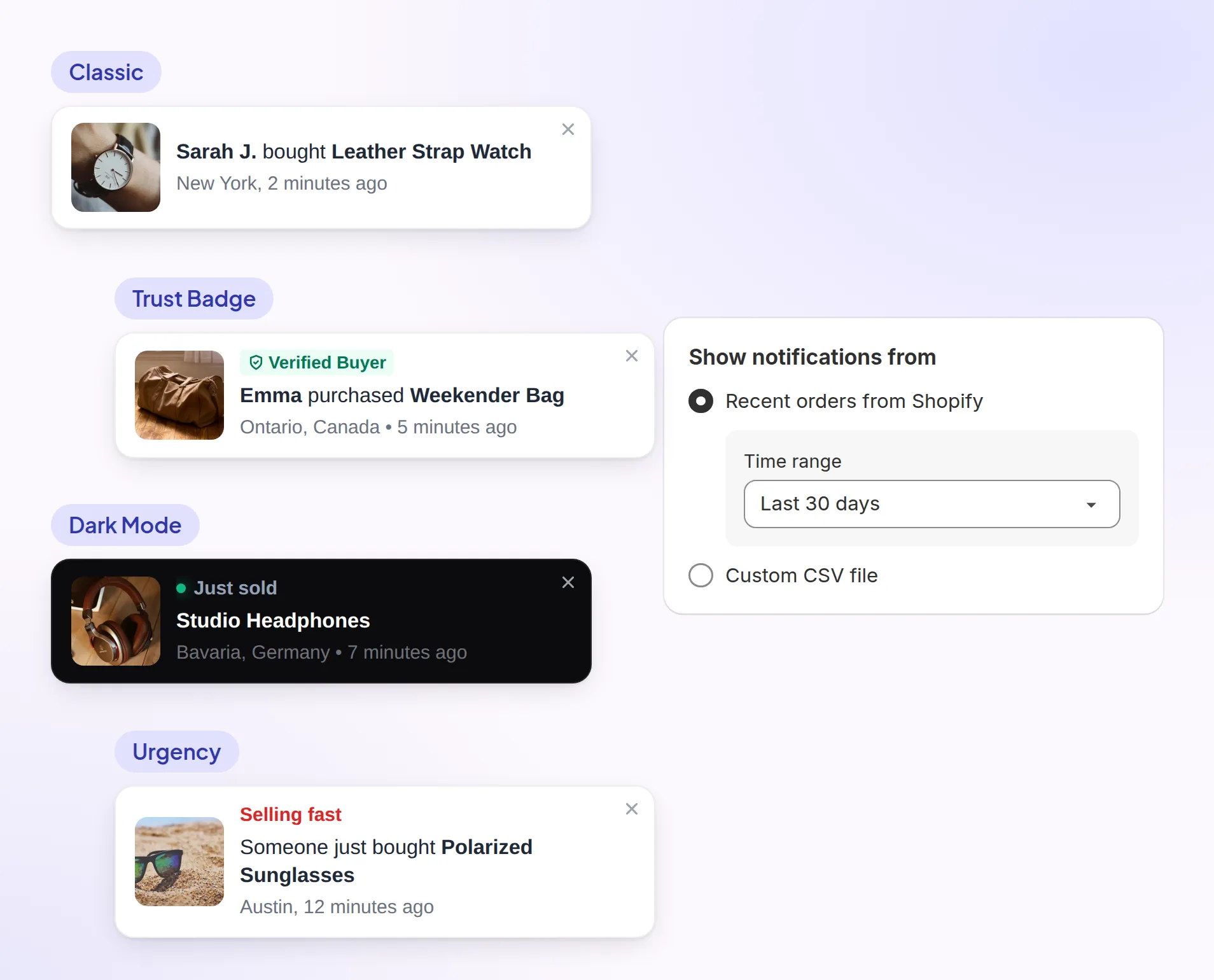
Four Sam FOMO recent sales pop-up templates, Classic, Trust Badge, Dark Mode and Urgency, beside the Show notifications from setting set to Recent orders from Shopify, last 30 days
The four Recent Sales templates and the order source setting.

Live visitors, sold count, low stock

Create urgency with live store data

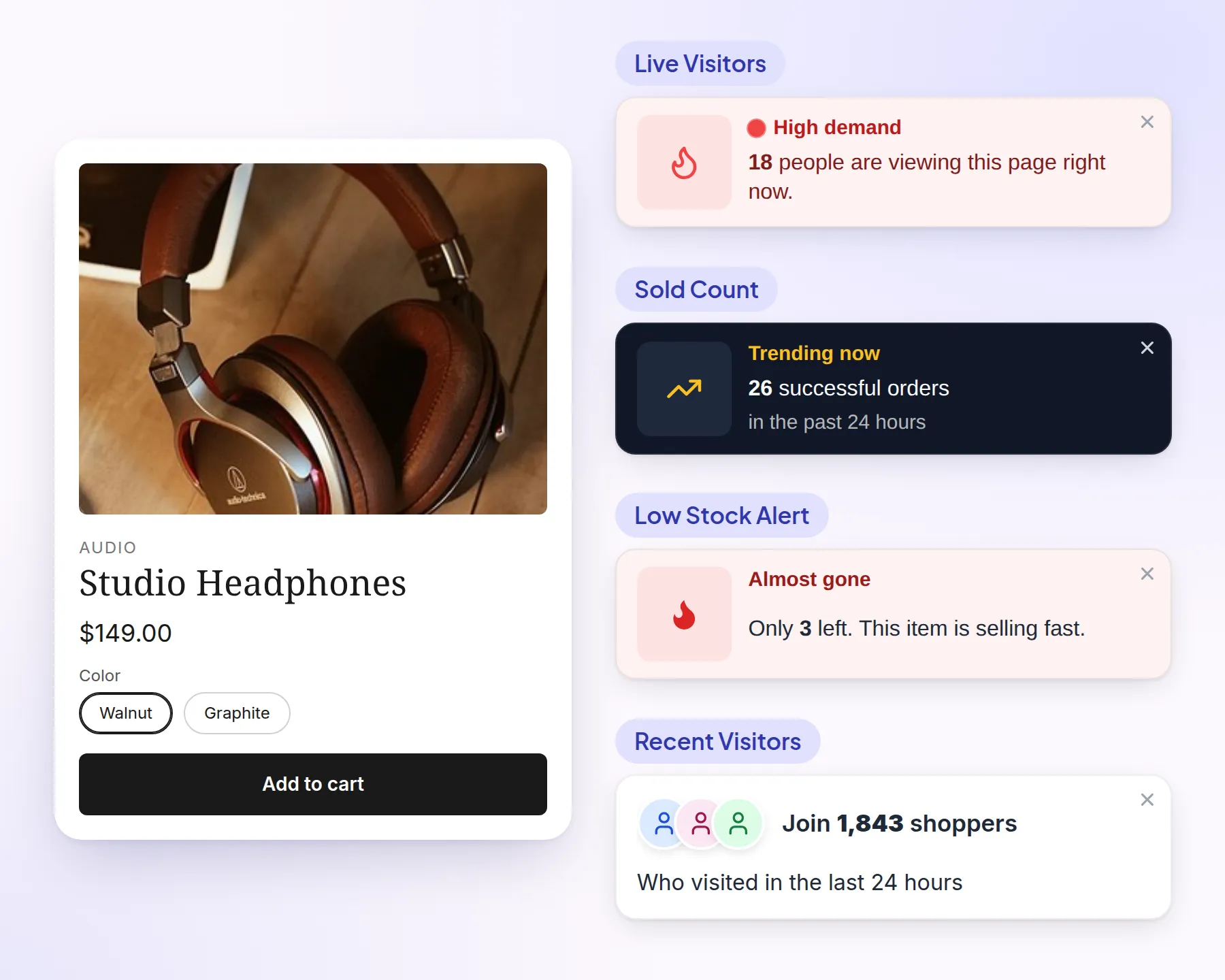
Social proof and scarcity notifications read your live store data, so the numbers shoppers see are real.

  • Live Visitors: people on this page or in your store right now
  • Sold Count and Recent Visitors: orders or visits in a time window you choose
  • Low Stock Alert: appears once Shopify inventory drops to your alert level
Set up urgency notifications →

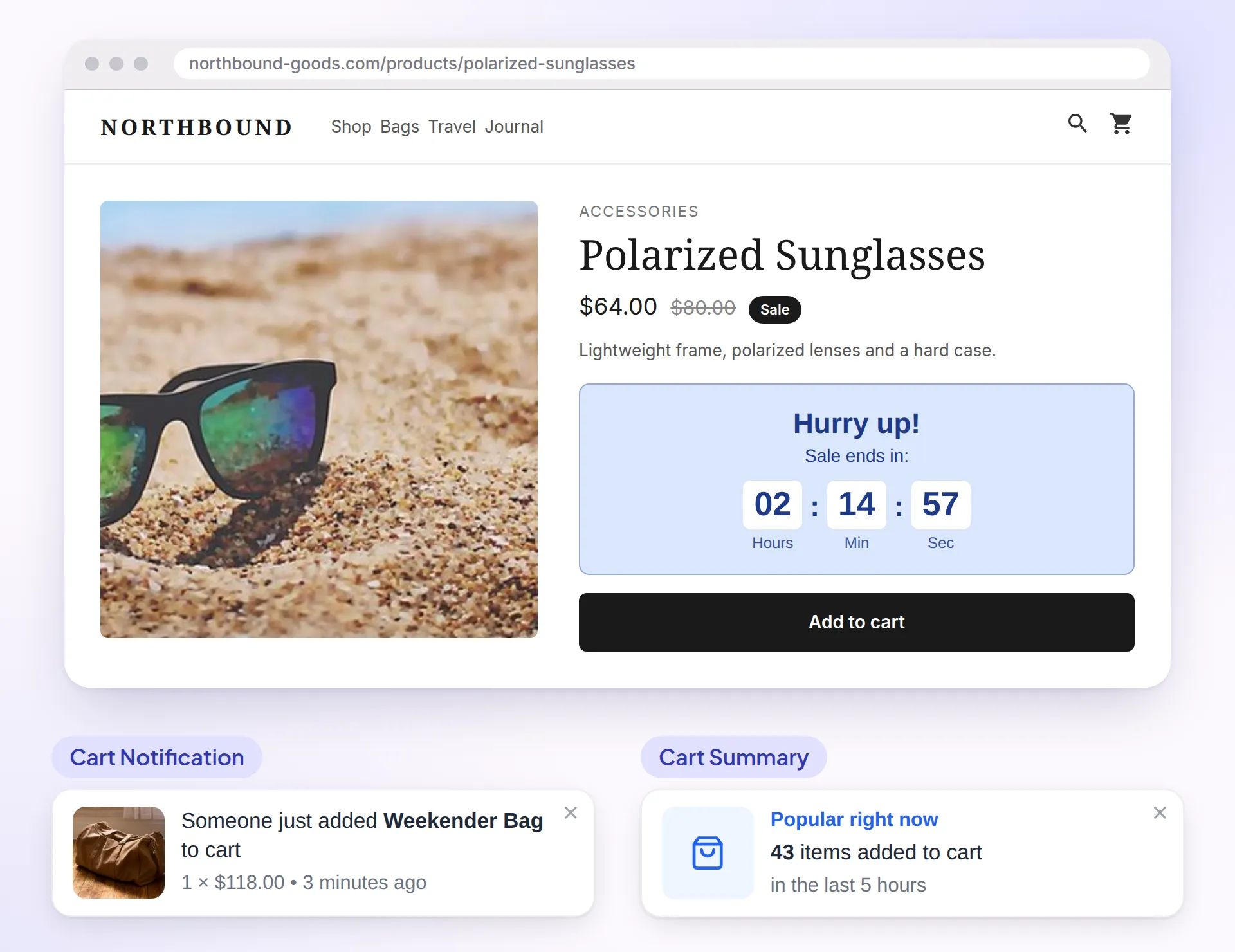
Countdown timer and cart activity

Nudge shoppers toward checkout

Add a countdown to a real deadline and show add-to-cart activity while shoppers decide.

  • Countdown on product pages, the cart, a top or bottom bar, or a landing page block
  • Ends at a fixed date, every day at midnight, or per visitor from their first visit
  • Cart Notification and Cart Summary show what other shoppers add to their carts
Set up a countdown timer →

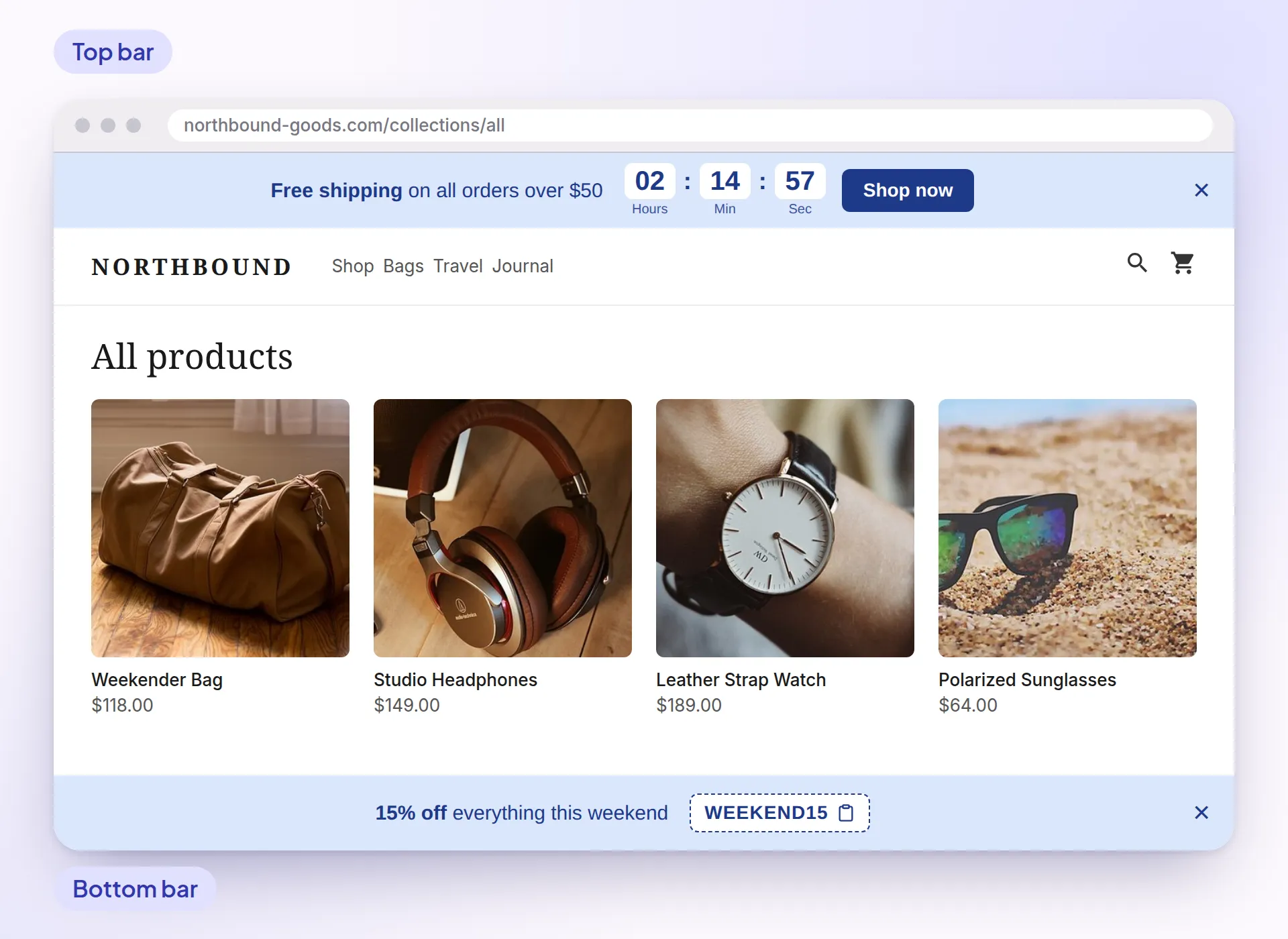
Promo Bar

Announce offers in a top or bottom bar

A full-width bar on every page for a free shipping threshold, a sale end date or a coupon code.

  • Add a countdown, a button and a coupon code shoppers can copy
  • Use your own code or a Shopify discount code, applied when shoppers click the button
  • Choose pages and devices, exclude products and set the colors
Add a promo bar →

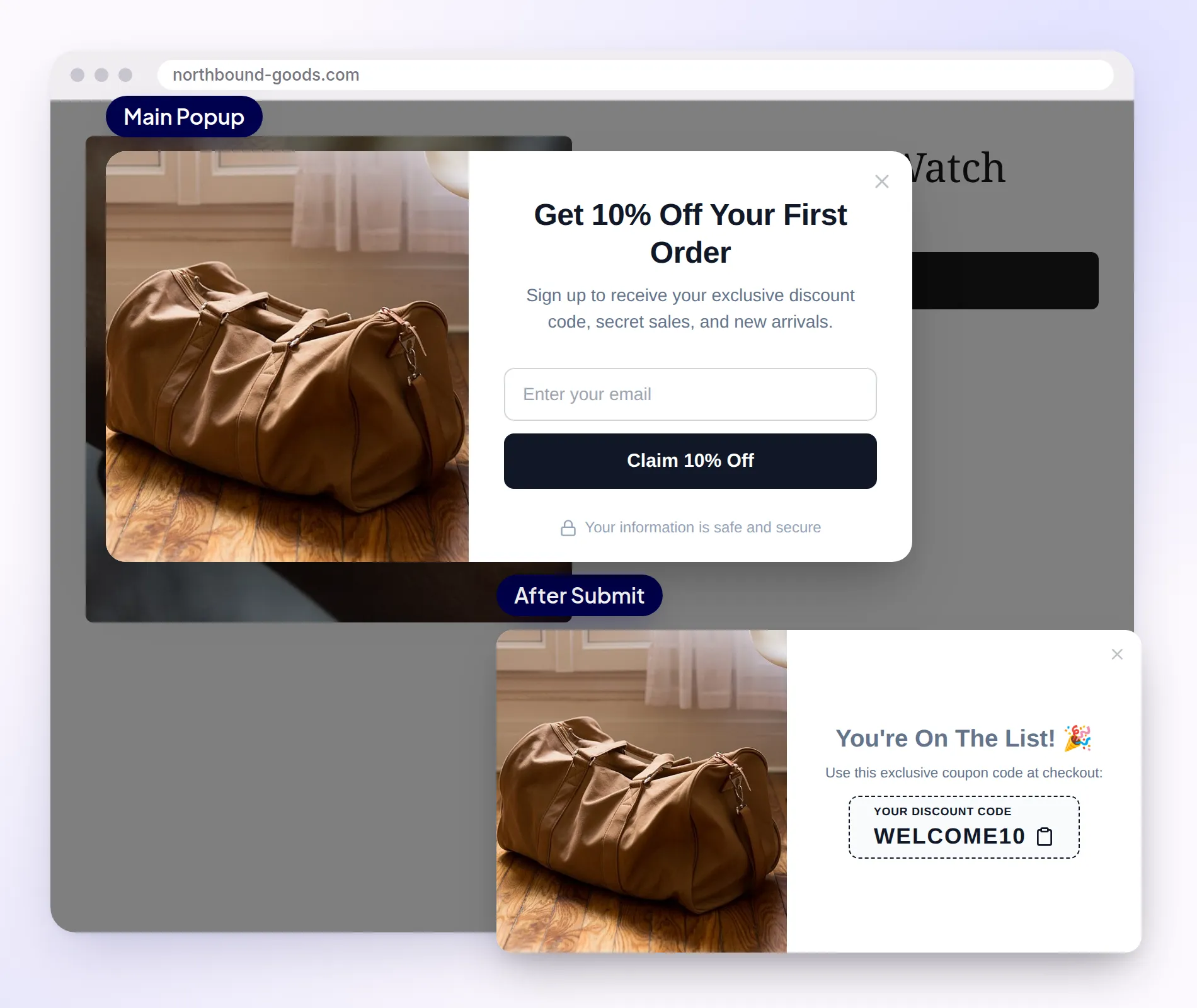
Email pop-ups

Grow your email list with a discount pop-up

Offer a discount in exchange for an email address and show the code right after sign-up.

  • Show it after a delay, on scroll, or on exit intent (desktop)
  • Give your own code or a Shopify discount code
  • Export subscribers as CSV, or sync them to Shopify Customers or a Klaviyo list
Create an email pop-up →

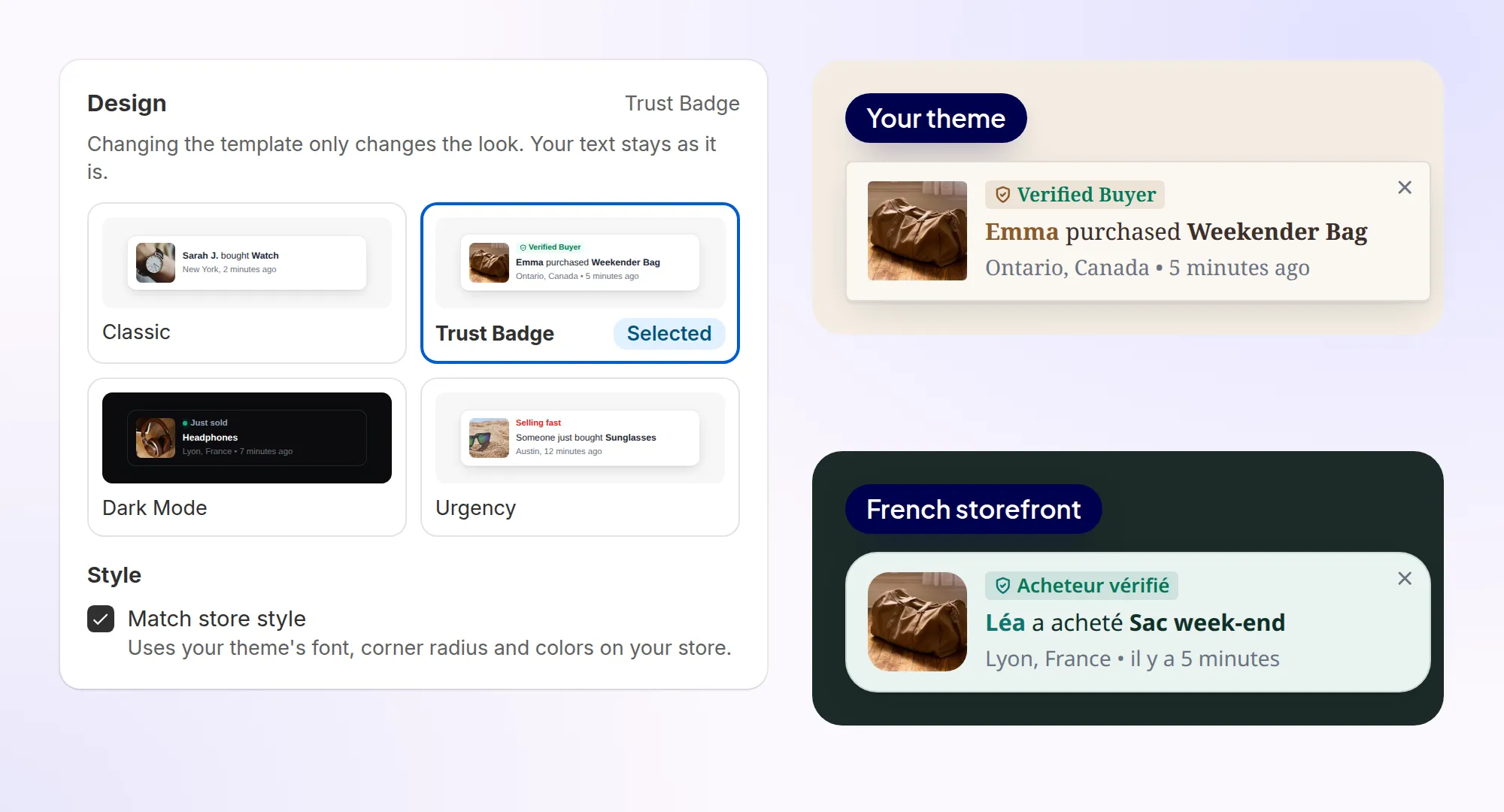
Design, placement and languages

Match your theme and your shoppers’ language

Pick a template and turn on Match store style to use your theme’s font, corner radius and colors.

  • Choose the corner, the pages, the timing and a separate position for phones
  • Built-in text, times and prices in the shopper’s language (13 languages)
  • A Translations section for the text you write
Design, placement and timing →

Analytics

See which pop-ups drive clicks

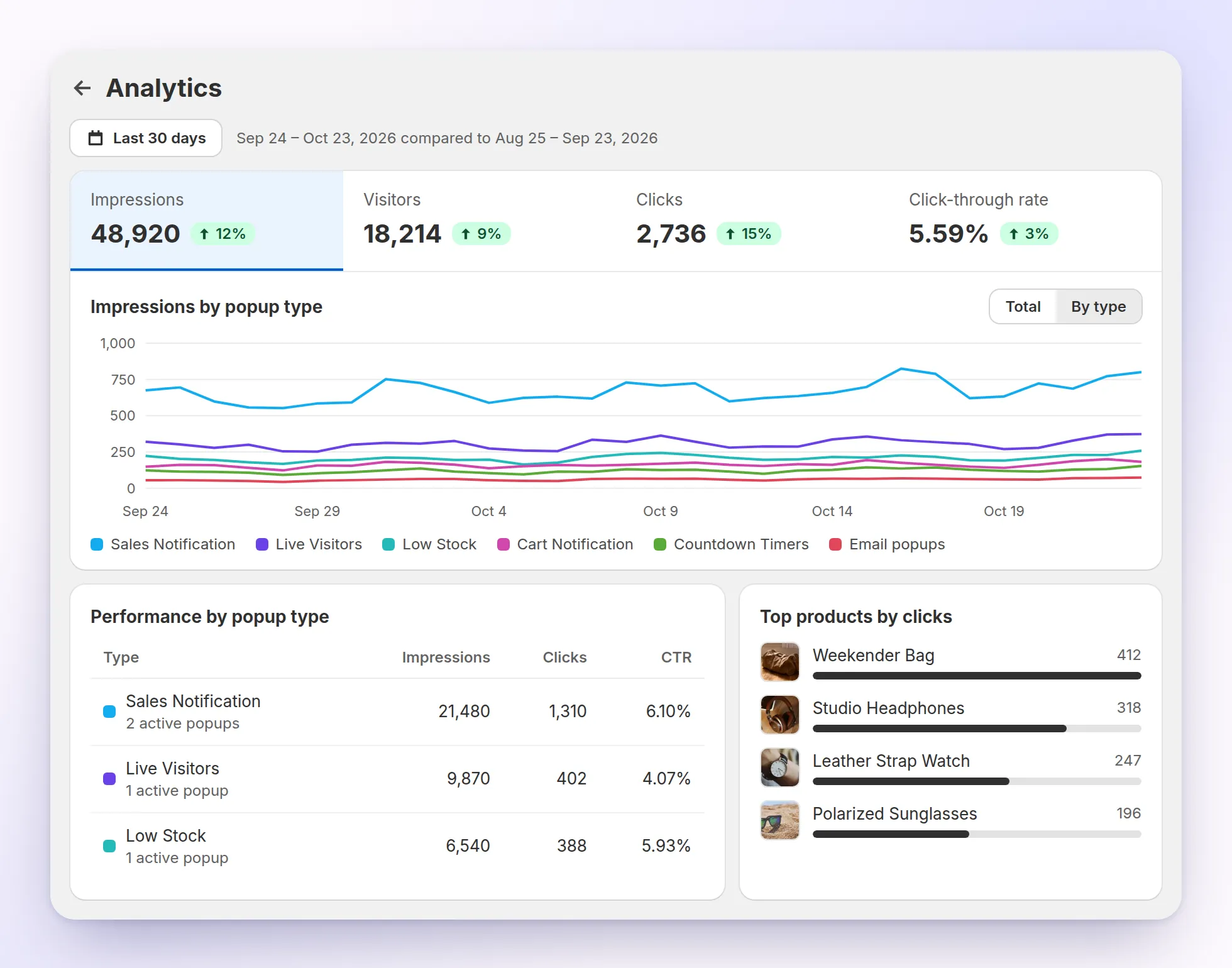
Track impressions, visitors, clicks and click-through rate for any period, compared with the one before.

  • Performance by popup type, with close rate and the mobile and desktop split
  • Top products by clicks and recently clicked products
  • Monthly impressions shown on the app home
Read about analytics →
Sam FOMO Analytics page with demo data: impressions, visitors, clicks and click-through rate, a chart of impressions by popup type, performance by popup type and top products by clicks
Analytics, shown with demo data.

Reviews

What do merchants say about Sam FOMO?

“Great app and excellent customer support! Very professional, friendly and helpful. Highly recommend!”

Luxor Finland Finland · Oct 2026 · Sam FOMO review

“Very great app to gain trust with your audience and it also helps to gain more sales by using their various features. One must try this app.”

Crybananacat India · Oct 2026 · Sam FOMO review

“I really like the look of the popups. Everything works as it should. New features are added on an ongoing basis.”

Verdelove.pl Poland · Oct 2026 · Sam FOMO review

“Great App to have installed on your store. Highly recommended”

Zenvora United States · Oct 2026 · Sam FOMO review

“The app is easy to use, with a clean and straightforward dashboard that makes everything simple to navigate. It does exactly what it promises, and customer support is exceptional. Wilson was really helpful”

Brivane Uganda · Aug 2026 · Sam FOMO review

“This app is wonderful and so easy to use, the customer support is amazing and as always really helpful. I love the way you can customise the icons and make it your own.”

Becoming Her For Real United Kingdom · Jun 2026 · Sam FOMO review

Read all 17 reviews on the Shopify App Store →

Works with

  • Checkout
  • Shopify Admin
  • Judge.me
  • Klaviyo

FAQ

Questions merchants ask

What is Sam FOMO?

Sam FOMO (Sam FOMO: Sales Pop Up & Proof) is a Shopify app by ShopWil that adds sales pop-ups and social proof to your store: recent orders, live visitors, sold counts, low stock alerts, cart activity, product reviews, countdown timers, a promo bar and email pop-ups. It is free to install from the Shopify App Store.

Are the sales notifications real?

Yes. Recent Sales pop-ups use your paid Shopify orders, which the app syncs for you. You can also upload a CSV file; only use it for orders that really happened, such as sales from another channel.

Where do the visitor, sold count and stock numbers come from?

Live Visitors counts shoppers active on the page or in the store in real time. Sold Count and Recent Visitors count orders or visits in the time window you set, and Low Stock Alert reads your Shopify inventory.

Which pop-up types does Sam FOMO include?

11 notification types: Recent Sales, Live Visitors, Recent Visitors, Product Reviews, Sold Count, Low Stock Alert, Countdown Timer, Flashing Tab, Cart Notification, Cart Summary and Promo Bar. Email pop-ups with a discount code are a separate module.

Where on my store do the pop-ups appear?

Notifications show in the corner you choose, with a separate position for phones, on all pages, the home page, product pages, collection pages, the cart page or specific pages. The promo bar runs along the top or bottom of every page.

Can I match the pop-ups to my theme?

Yes. Pick a template (Recent Sales has Classic, Trust Badge, Dark Mode and Urgency) and turn on Match store style to use your theme’s font, corner radius and colors, or set your own colors, gradient and opacity.

Does Sam FOMO work in other languages?

Built-in pop-up text such as time units, countdown labels and email pop-up messages comes in English, Spanish, French, German, Italian, Dutch, Portuguese (Brazil and Portugal), Polish, Swedish, Turkish, Japanese and Simplified Chinese. Times and prices follow the shopper’s language, and each pop-up has a Translations section for your own text.

Will Sam FOMO slow down my store?

It is built to stay light: the app embed loads one deferred script from Shopify’s CDN, reads its settings from app metafields, and draws pop-ups inside a shadow DOM so they don’t clash with your theme’s CSS.

Can I send email sign-ups to Klaviyo?

Yes. Sign-ups from email pop-ups are listed under Subscribers, where you can export them as CSV. You can also sync them to Shopify Customers or send them straight to a Klaviyo list.

How much does Sam FOMO cost?

Sam FOMO is free to install on the Shopify App Store. Each time a pop-up shows counts as one impression; the app home shows the impressions used this month and your limit, and the “Need more?” button opens a chat if you need a higher limit.

Read the full Sam FOMO user guide →

Try Sam FOMO free

Install from the Shopify App Store and turn on your first sales pop-up in minutes.

Install free on Shopify

★ 4.6 (17 reviews) Built for Shopify Free plan available

Also by ShopWil: Sam Bundles for quantity breaks and bundles, and Sam Shipping Protection for self-funded shipping protection. See all apps.