

Sam Shipping Protection guide · More features
Add an order tracking page
In short
Open Tracking page in the app and turn it on. Click Customize to change its look, use Add tracking page to put the link in your store menu, and translate it under Translations. Customers enter their order details to see the shipment status. Only shipments created after you turn it on can be found.
A tracking page lets customers check where their order is without emailing you, which also cuts “where is my order” messages before they turn into claims.
- Click Turn on (1). Tracking numbers can only be found for shipments created after you turn it on.
- Click Customize (2) to change the look and text.
- Click Add tracking page (3) to add it to your store’s menu. You can also copy the tracking page URL shown above the button.
- Use Translate all (4) to translate the page into your store languages, or edit each language with the pencil icon.
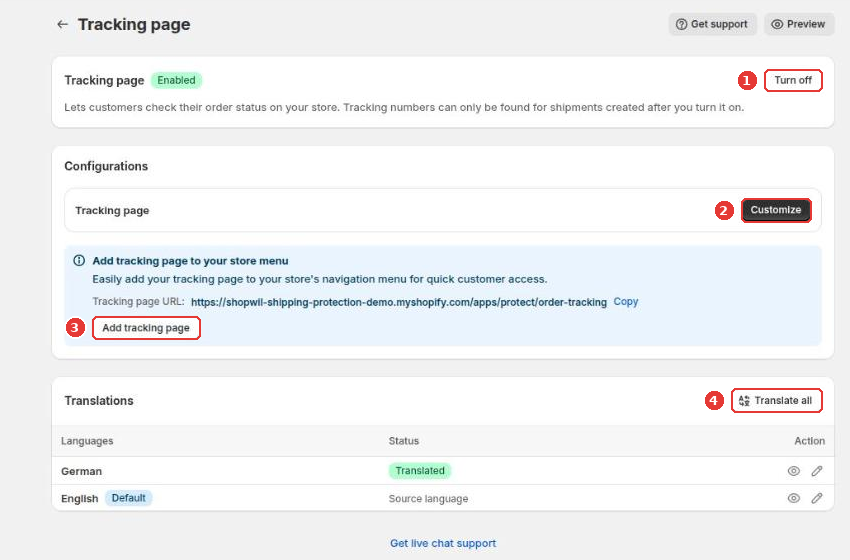
The tracking page is served at /apps/protect/order-tracking on your store. You can also place it inside any page with the Order Tracking app block in the theme editor, the same way as the claim page.
Still need help?
Our developers answer support themselves. Chat with us or email [email protected].