

FAQs
How do plans and the Starter order limit work?
Starter is free for up to 50 protected orders a month (30 for stores installed before September 9, 2026). At the limit, the protection widgets hide until next month. Standard and Plus have no limit and add features. Change plans on the Plans page. You keep every protection fee.
Your plan sets how many protected orders you can take each month and which features you can use. Your store keeps every protection fee, on every plan. For prices, see Sam Shipping Protection pricing.
How does the Starter order limit work?
Starter includes 50 protected orders a month, or 30 for stores that installed Sam before September 9, 2026. Standard and Plus have no limit.
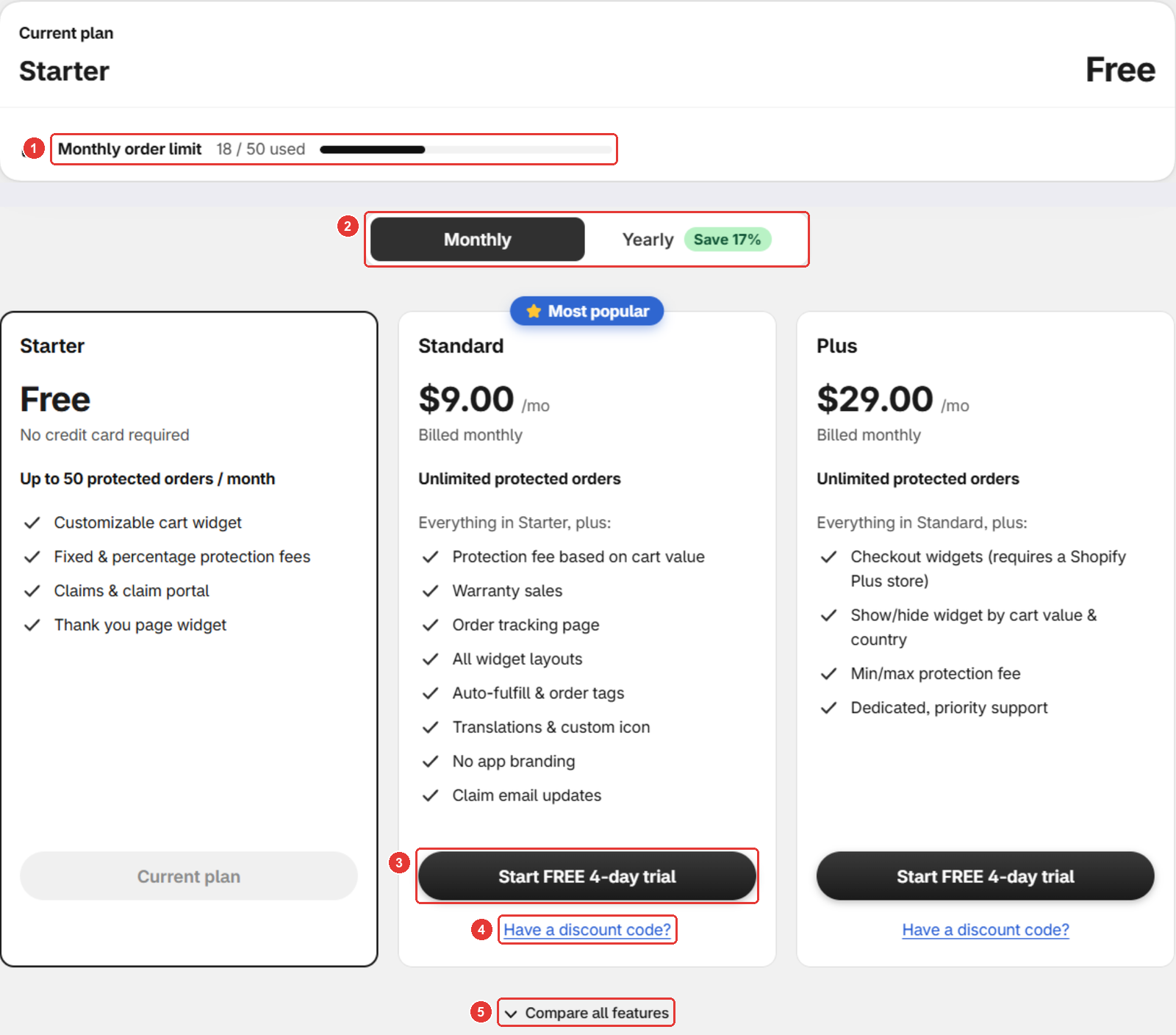
- See your usage under Monthly order limit (1) on Plans, or Monthly limits on Home.
- Sam emails your store email address at 80% of the limit and again when you reach it.
- At the limit, the protection widgets hide until next month or until you upgrade.
Which plan do you need?
- Starter: the cart widget, fixed and percentage fees, claims, the claim portal and the thank-you page offer.
- Standard: no order limit, plus extended warranties, the order tracking page, all widget layouts, translations, a custom icon, auto-fulfill and order tags, no app branding and claim emails.
- Plus: everything in Standard, plus checkout widgets (Shopify Plus stores only), widget rules by cart value and country, and a minimum and maximum fee.
On some older stores, claim emails are part of Plus. Click Compare all features (5) for the full list.
How do you change your plan?
- Open Plans and choose Monthly or Yearly (2).
- Click the button on the plan you want (3), such as Start FREE 7-day trial or Choose Standard.
- Approve the subscription on the Shopify page.
Charges appear on your Shopify invoice. Your first paid plan includes a 7-day free trial, once per store. Have a discount code? Click Have a discount code? (4), enter the code and click Apply.
How do you downgrade?
- On the lower plan’s card, click Choose and the plan name, for example Choose Starter.
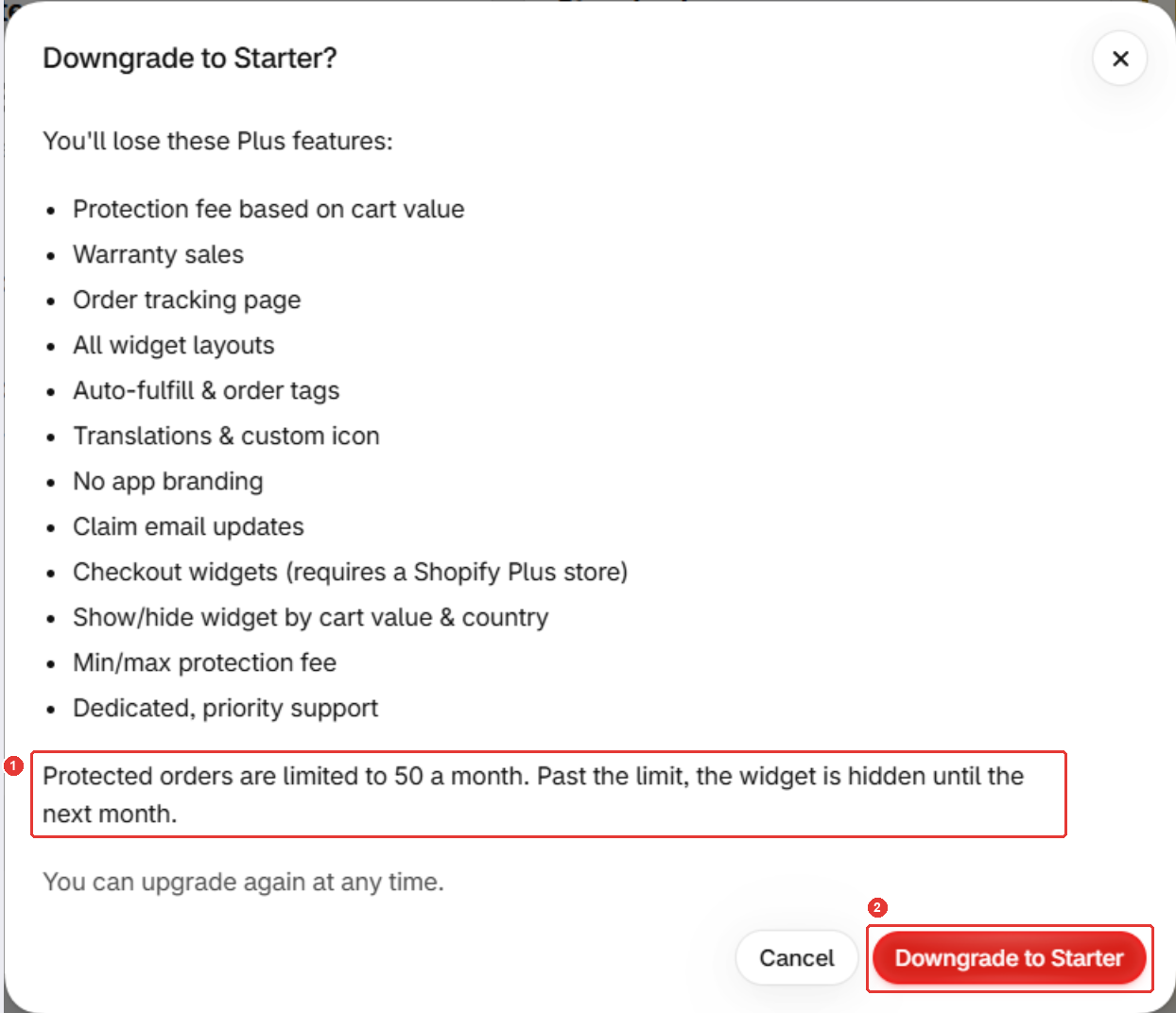
- Read the dialog. It lists the features you’ll lose and, for Starter, the order limit (1).
- Click Downgrade to and the plan name (2).
Good to know
- Moving to Starter takes effect right away. The order limit and the “Powered by ShopWil” line come back, and warranty offers and the tracking page stop.
- Plus to Standard asks you to approve the change on a Shopify page, like an upgrade.
- Widget missing for another reason? See Can’t see the protection widget? or the FAQ.
Frequently asked questions
Do protection fees go to ShopWil?
No. Your store keeps 100% of the protection fees, on every plan. Your plan is billed separately through Shopify.
What happens when I reach the Starter order limit?
The protection widgets hide until next month. Upgrade to Standard or Plus to show them again right away.
Does changing plans restart the free trial?
No. Each store gets one 7-day trial, even if you switch plans or reinstall the app.
Can I downgrade at any time?
Yes. A move to Starter takes effect right away.
Still need help?
Our developers answer support themselves. Chat with us or email [email protected].