

Sam Shipping Protection guide · More features
Sell extended warranties on product pages
In short
Open Warranty, click Create rule, name it and set a priority, choose the target products, then add one or more offers priced as a fixed amount or a percentage of the product price. Edit the content and appearance, check the preview and save. The offer shows on product pages through the app embed.
Warranties let shoppers add an extended warranty to a product before they buy it. The offer shows on product pages through the same app embed as the cart widget, so make sure the app embed is on.
Manage your rules
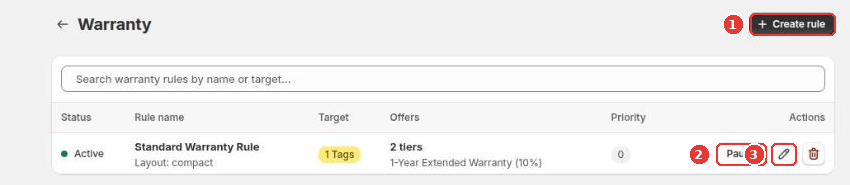
Open Warranty in the app menu. Click Create rule (1) to add one. For existing rules, Pause (2) stops a rule without deleting it, and the pencil icon (3) edits it.
Set up a rule
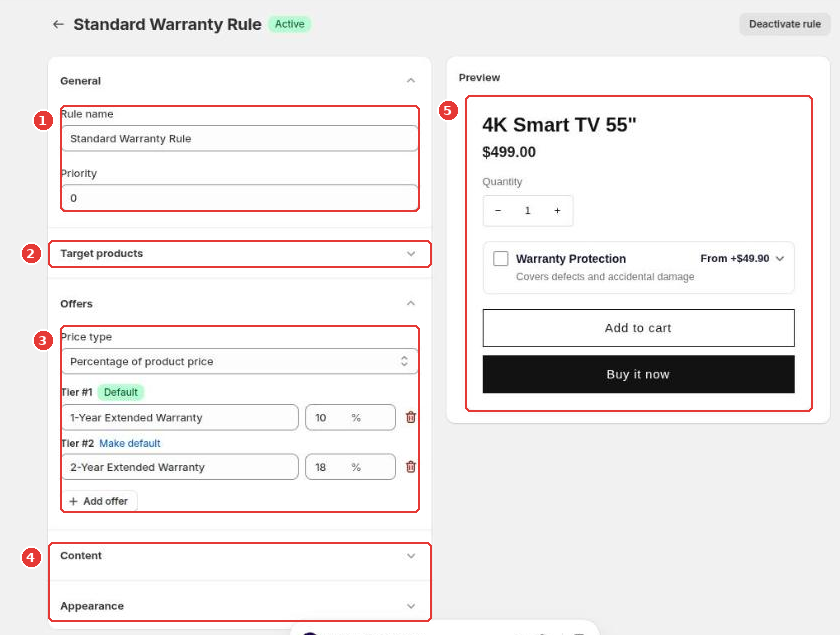
- General (1): the rule name, and a priority. When a product matches more than one rule, the rule with the higher number wins.
- Target products (2): which products show the offer.
- Offers (3): choose Percentage of product price or Fixed amount, then add one tier per warranty length. Mark one tier as the default.
- Content and Appearance (4): the title, description and style of the offer.
- Check the Preview (5), then click Save in the bar at the top of the page.
The chosen warranty is attached to the product in the cart, so each order shows which warranty the customer bought.
Still need help?
Our developers answer support themselves. Chat with us or email [email protected].