

Sam Shipping Protection guide · Get started
Install the app and turn on the app embed
In short
After installing Sam Shipping Protection, open Online Store > Themes > Edit theme, go to App embeds, switch on Sam Shipping Protect and click Save. The widget then shows in the cart page and cart drawer once your protection price is set.
The cart widget is a Shopify app embed. Shopify keeps app embeds off until you switch them on in your theme, so this is the first thing to do after installing.
Step 1: Install the app
Install Sam Shipping Protection from the Shopify App Store and approve the permissions. The app opens on its home page, with a setup guide at the top.
When you turn on protection, the app creates a Shipping Insurance product in your store. Shopify needs a product to add the fee to the cart. Keep this product: you can rename it and change its image, but don’t delete it. See Rename the protection product.
Step 2: Open the theme editor
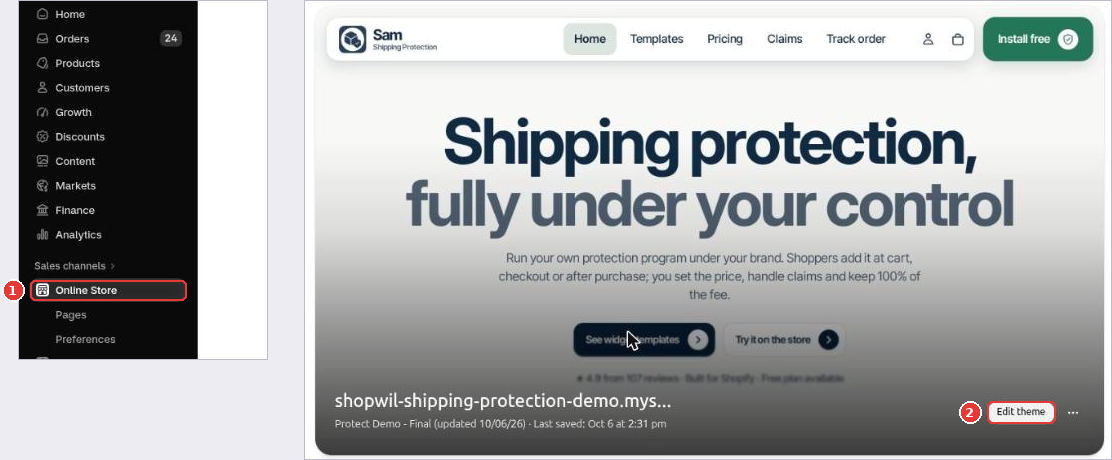
In Shopify admin, go to Online Store (1) and click Edit theme (2) on your live theme.
Step 3: Turn on the app embed
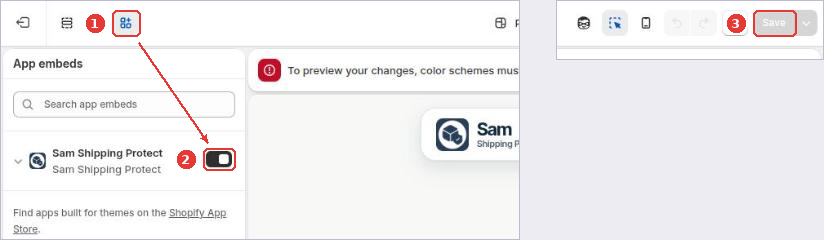
- Click the App embeds icon (1) in the left toolbar.
- Switch on Sam Shipping Protect (2).
- Click Save (3).
Step 4: Check the app home
Open the app again. App embed status should now show Active. If it still says inactive, reload the page, and make sure you saved the theme you have published.
Next, set your protection price.
Still need help?
Our developers answer support themselves. Chat with us or email [email protected].