

Sam FOMO guide · Get started
Sam FOMO user guide
In short
Sam FOMO shows sales popups and social proof built from your own store data, adds urgency with low stock alerts and countdown timers, runs a promo bar and collects emails with discount popups. Turn on the app embed first, then create a notification and an email popup.
Sam FOMO adds social proof and urgency to your store with small popups that use your real store data. Shoppers see that others are buying, how many people are looking at a product, and when stock or a sale is about to run out.
What you can create
Notifications (small popups in a corner of the page):
- Social proof: Recent Sales, Live Visitors, Recent Visitors, Product Reviews and Sold Count.
- Urgency: Low Stock Alert, Countdown Timer and Flashing Tab.
- Cart activity: Cart Notification and Cart Summary.
- Promotions: a Promo Bar at the top or bottom of every page.
Popups: email popups that offer a discount code in exchange for an email address, with the emails listed under Subscribers.
Set up in three steps
- Install the app and turn on the app embed.
- Create your first notification, for example Recent Sales.
- Add an email popup or a promo bar.
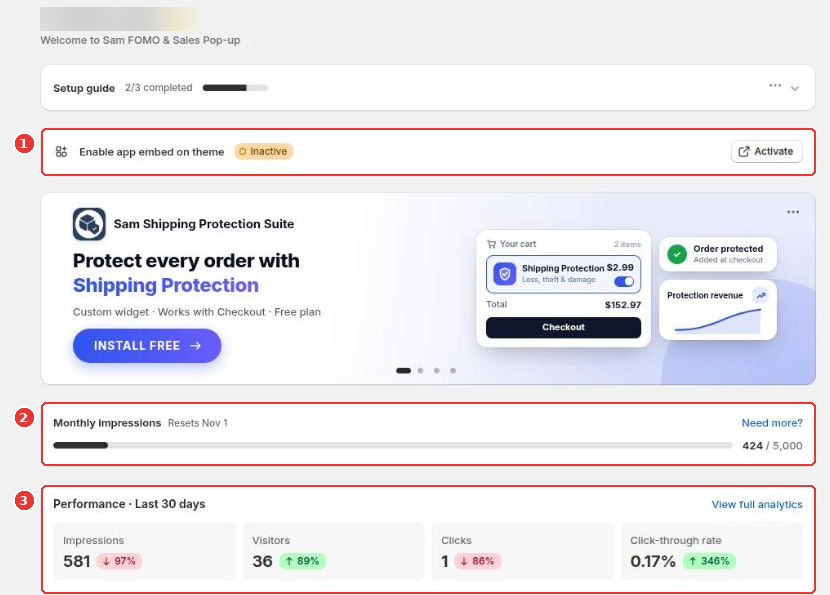
The app home shows whether the app embed is on (1), how many impressions you used this month (2) and how your popups perform (3).
Still need help?
Our developers answer support themselves. Chat with us or email [email protected].