

Sam Shipping Protection guide · Widgets
Fulfillment, order tags, visibility and exclusions
In short
In Protection Settings > Config, Advanced settings control auto fulfillment of the protection item and order tags. Visibility & targeting hides the widget below a minimum cart value or outside chosen countries. Exclusions turn protection off for logged-in customers, guests, customers with a tag or chosen products.
These settings are on Protection Settings, on the Config tab, below the pricing and content cards. Click Save in the bar at the top of the page after any change.
Auto fulfillment and order tags
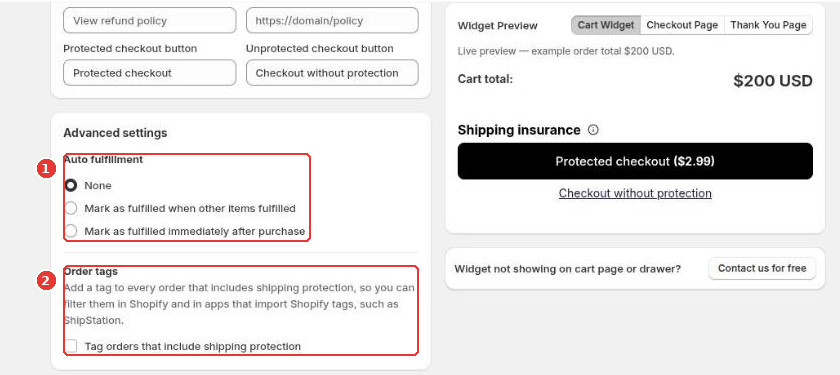
The protection item is a digital product, so it never ships. Auto fulfillment (1) decides when Shopify marks it as fulfilled:
- None: you fulfill it yourself.
- Mark as fulfilled when other items fulfilled: it follows the rest of the order.
- Mark as fulfilled immediately after purchase: it is fulfilled as soon as the order is paid.
Order tags (2) adds a tag to every order that includes shipping protection, so you can filter those orders in Shopify and in apps that import Shopify tags, such as ShipStation.
Visibility and exclusions
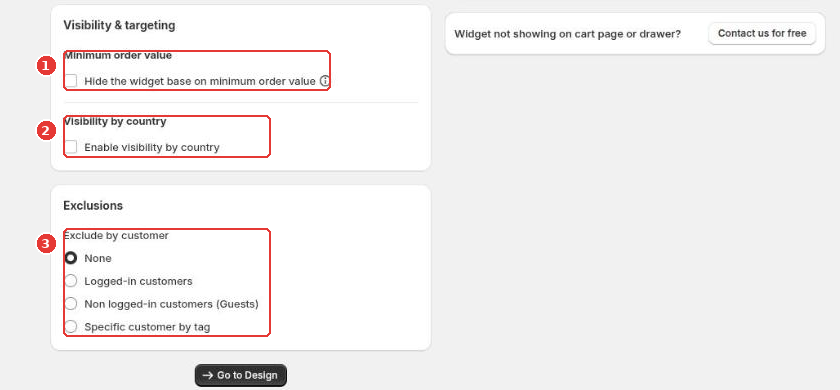
- Minimum order value (1): hide the widget when the cart total is below an amount you choose.
- Visibility by country (2): show the widget only to shoppers in the countries you select.
- Exclusions (3): don’t offer protection to logged-in customers, to guests, or to customers with a specific tag. With percentage pricing you can also exclude products from the price calculation.
Visibility rules by cart value and country are part of the Plus plan. If an option is locked, the app shows an upgrade link next to it.
Still need help?
Our developers answer support themselves. Chat with us or email [email protected].