

Sam FOMO guide · Email & promotions
Add a promo bar
In short
Create a notification of type Promo Bar. Choose top or bottom of all pages, write the message, then turn on a countdown, add a button and coupon code, set where it shows and pick colors. Check the preview and save. Use it for free shipping thresholds, sales and coupon codes.
A promo bar is a full-width strip at the top or bottom of every page. It is the clearest place for a free shipping threshold, a sale end date or a coupon code.
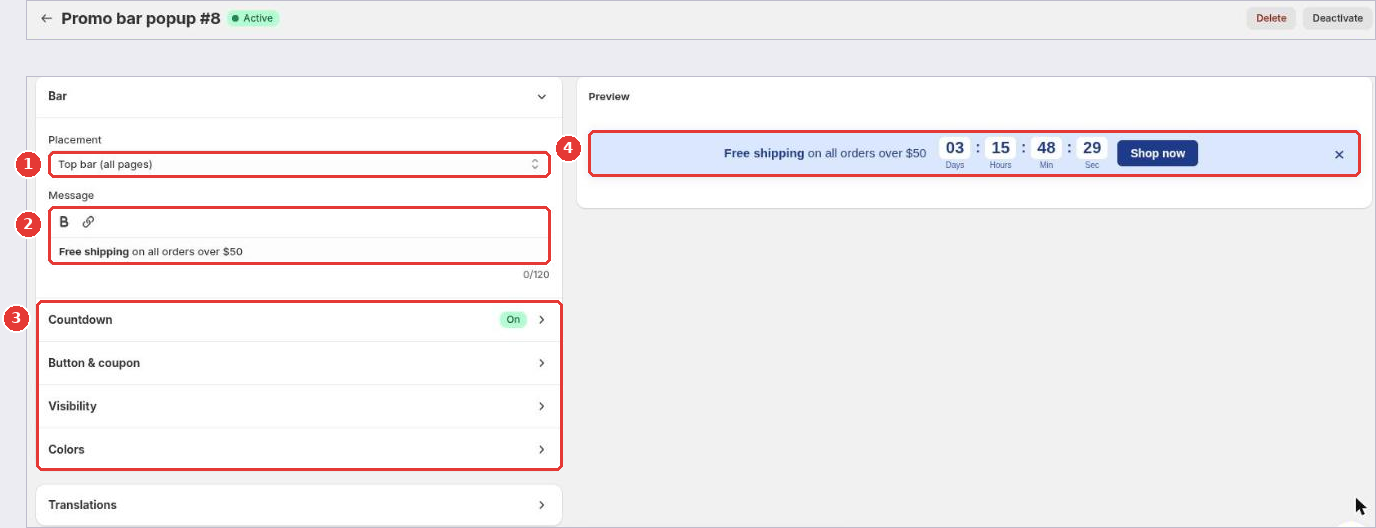
- Under Bar, choose the Placement (1): Top bar (all pages) or Bottom bar (all pages).
- Write the Message (2). Use bold and links for the key words.
- Open the other sections (3):
- Countdown: add a countdown timer next to the message.
- Button & coupon: add a button such as “Shop now” with its link, and show a coupon code: your own code or one of your Shopify discount codes. You can apply the code when shoppers click the button.
- Visibility: choose the pages and devices, and exclude products.
- Colors: match the bar to your store.
- Check the Preview (4), then click Save in the bar at the top of the page.
Like other notifications, the promo bar has a Translations section for your other store languages.
Still need help?
Our developers answer support themselves. Chat with us or email [email protected].