

Sam FOMO guide · Settings
Analytics and monthly impressions
In short
Analytics shows impressions, visitors, clicks and click-through rate for any period, compared with the previous one, plus a breakdown by popup type and the products shoppers click. The app home shows the impressions used this month and when the count resets; click Need more? if you need a higher limit.
Analytics
Open Analytics in the app menu.
- Pick the period (1). Numbers are compared with the period before.
- The top row (2) shows Impressions, Visitors, Clicks and Click-through rate. Click one to chart it.
- Switch the chart between Total and By type (3).
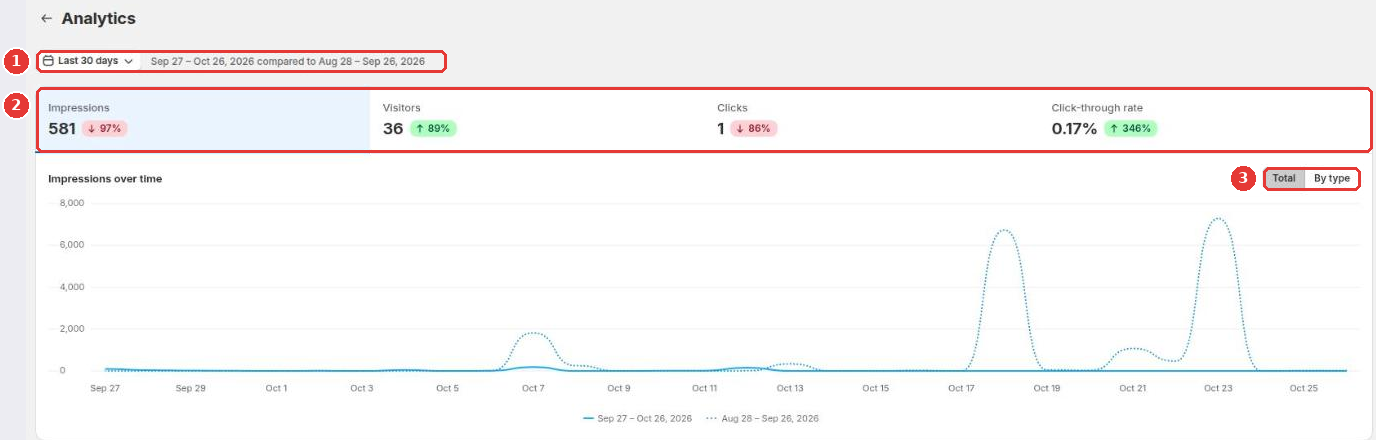
Below the chart, Performance by popup type lists impressions, clicks, CTR, close rate and the mobile/desktop split for each type. Top products by clicks and Recently clicked products show which products shoppers open from your popups.
Monthly impressions
Each time a popup shows to a shopper counts as one impression. The Monthly impressions card on the app home shows how many you used this month, your limit and when the count resets. If you need more, click Need more? to chat with us.
Still need help?
Our developers answer support themselves. Chat with us or email [email protected].