

Sam FOMO guide · Popups
Low stock, countdown, visitors and cart activity
In short
Low Stock Alert shows how many items are left once stock drops to the level you set. Countdown Timer runs to a fixed date, to midnight every day, or per visitor, on product pages, the cart, a bar or a landing page. Visitor, sold count, cart activity and review notifications use your live store data.
All these types are created the same way: Notifications > Create notification, pick the type and click Add. They share the design, placement and timing settings; only the Content section differs.
Low Stock Alert
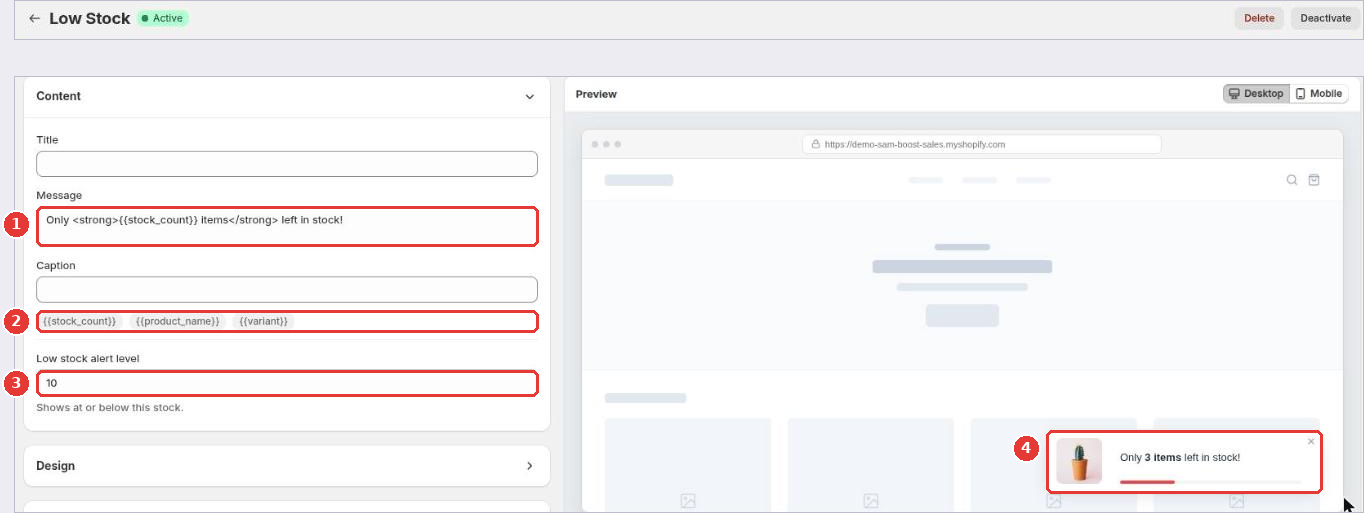
- Write the Message (1). The default reads “Only
{{stock_count}}items left in stock!”. - Insert variables (2):
{{stock_count}},{{product_name}}and{{variant}}. - Set the Low stock alert level (3). The alert shows when stock is at or below this number.
- Check the preview (4) and click Save.
Countdown Timer
Choose where the timer shows: on product pages below the add to cart button, on the cart page, in a top or bottom bar on all pages, or on a landing page. For a landing page, add the Countdown timer block in the theme editor (Add section > Apps).
Then choose how it ends:
- Ends at a fixed date & time: for a sale with a real end.
- Ends every day at midnight: for daily deals.
- Per visitor, starts at first visit: each shopper gets their own countdown.
Visitors and sold count
- Live Visitors: how many people are on the page or the store right now.
- Recent Visitors: how many shoppers visited in a recent period.
- Sold Count: how many orders a product had in a time window you choose.
Cart activity and reviews
- Cart Notification: shows add-to-cart actions as they happen, for example “Someone added Travel Bag to their cart”.
- Cart Summary: how many items shoppers added to carts recently.
- Product Reviews: recent 5-star reviews or ratings from Judge.me or Shopify product ratings.
- Flashing Tab: when a shopper switches to another browser tab, your tab title flashes a short message to bring them back.
Frequently asked questions
Are the visitor and stock numbers real?
Yes. Live visitors are counted in real time, sold count comes from your orders, and low stock comes from your Shopify inventory. Honest numbers build more trust than invented ones.
Still need help?
Our developers answer support themselves. Chat with us or email [email protected].