

Sam FOMO guide · Get started
Install Sam FOMO and turn on the app embed
In short
Popups only show on your store once the Sam Boost Sales app embed is on. In the app home, click Enable in the setup guide (or Activate). The theme editor opens with the embed switched on; click Save. Back in the app, the status turns Active.
Sam FOMO shows its notifications through a Shopify app embed. Until it is on, nothing appears on your store, and the app shows a yellow App embed is not enabled banner on every page.
Step 1: Open the setup guide
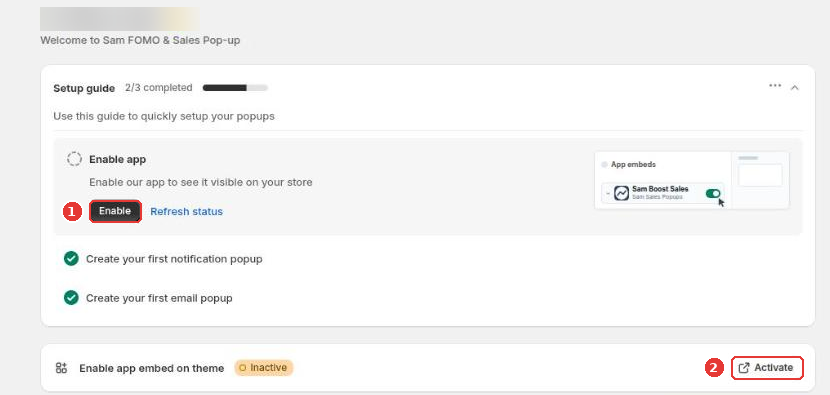
Install Sam FOMO and open it. On the home page, expand the Setup guide and click Enable (1). You can also click Activate (2) next to Enable app embed on theme.
Step 2: Save the theme
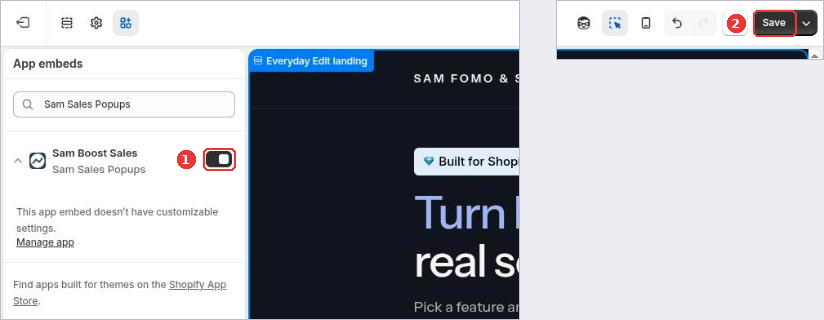
The theme editor opens on App embeds with Sam Boost Sales already switched on (1). Click Save (2).
Step 3: Check the status
Go back to the app and click Refresh status. Enable app embed on theme shows Active, and the yellow banner disappears.
Still need help?
Our developers answer support themselves. Chat with us or email [email protected].