

Sam Bundles guide · Settings
Schedule, placement and discount combinations
In short
Schedule runs an offer between a start and end date. Placement shows bundles on the pages of the included products and sets where shoppers go after Add to cart (current page, cart or checkout). Advanced sets which discounts the offer combines with and which customers can use it.
These cards appear in every offer editor, below the main settings.
Schedule
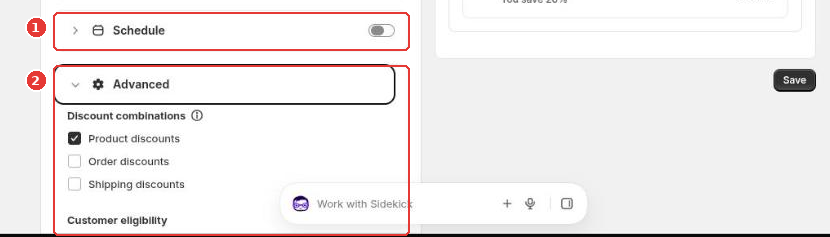
Switch on Schedule (1) and set a Start date and time. Tick Set end date to stop the offer automatically, which suits limited-time sales.
Placement
For mix and match, bundle builder and fixed bundles:
- Show on included products page: show the bundle on the product pages of the items it contains.
- Redirect after Add to cart: send shoppers to the Current page, the Cart page or the Checkout page after they add the bundle.
To place a widget at a specific spot on the page, add its block in the theme editor (Add section > Apps).
Advanced
Open Advanced (2):
- Discount combinations: tick which other discounts can apply together with this offer: Product discounts, Order discounts and Shipping discounts.
- Customer eligibility: offer it to All customers, Logged-in customers, Non logged-in customers or customers with specific Customer tags.
Still need help?
Our developers answer support themselves. Chat with us or email [email protected].