

Sam Bundles guide · Offers
Set up a fixed bundle
In short
A fixed bundle sells a set of products together, for example a hand salve, body lotion and face oil. Browse and add up to 30 products, set a percentage or amount off, or type your own bundle price, then style the widget, choose where it shows and save.
Start from Create new offer > Product Fixed Bundle.
- Click Browse products (1) and add the items. A bundle can include up to 30 products, 3 options and 2,048 variants.
- Under Pricing, choose the Price type and Discount (2).
- The Bundle price (3) is calculated from the discount. Edit it to set your own price.
- Style, Placement and Schedule (4) finish the offer. See Schedule, placement and discount combinations.
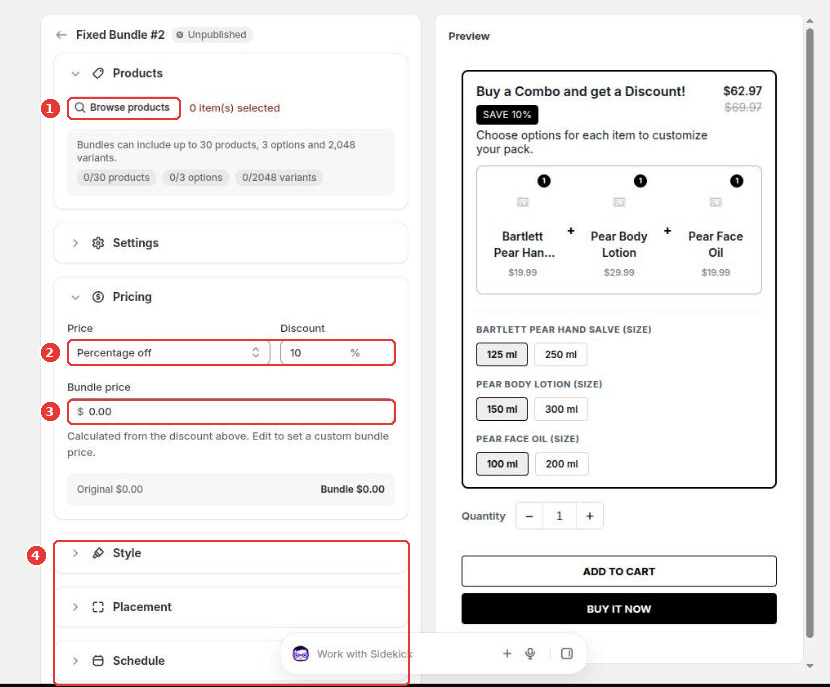
Shoppers pick the options for each item, such as size, and add the whole bundle to the cart in one click. Click Save to publish.
Still need help?
Our developers answer support themselves. Chat with us or email [email protected].