

Sam Bundles guide · Offers
Set up a mix and match bundle
In short
In a mix and match bundle, you create options, such as a shirt, shorts and socks, and add the products customers can pick for each. They choose one product per option and get the bundle discount, set as a percentage or amount off. Set the texts, pricing, style, placement and schedule, then save.
Start from Create new offer > Mix & Match.
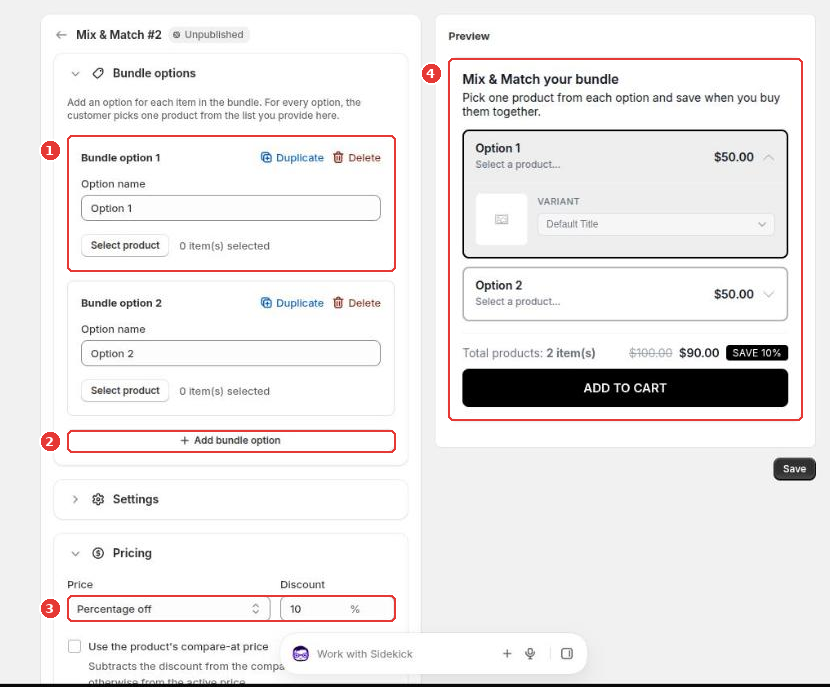
- Each Bundle option (1) is one item in the bundle. Name it, then click Select product to add the products shoppers can choose from. Duplicate copies an option.
- Click Add bundle option (2) for each extra item.
- Under Pricing (3), choose Percentage off or Amount off and enter the discount. Tick Use the product’s compare-at price to subtract the discount from the compare-at price.
- The Preview (4) shows the bundle as shoppers will see it.
Below Pricing, Settings holds the widget title, description and labels, and Style, Placement, Schedule and Advanced work as described in Schedule, placement and discount combinations. Click Save to publish.
Still need help?
Our developers answer support themselves. Chat with us or email [email protected].