

Sam Bundles guide · Get started
Install Sam Bundles and turn on the app embed
In short
Offers only show on your store once the Sam Bundles app embed is on. In the app home setup guide, open Enable app embed and click Active app embed, or go to Online Store > Edit theme > App embeds, switch on Sam Bundles and click Save. The app status then shows Active.
Sam Bundles shows its offers through a Shopify app embed. It loads the offer widget on your product pages and places it next to the product form.
Step 1: Open the setup guide
Install Sam Bundles and open it. In the Setup guide, open Enable app embed and click Active app embed. The theme editor opens.
Step 2: Switch on the app embed
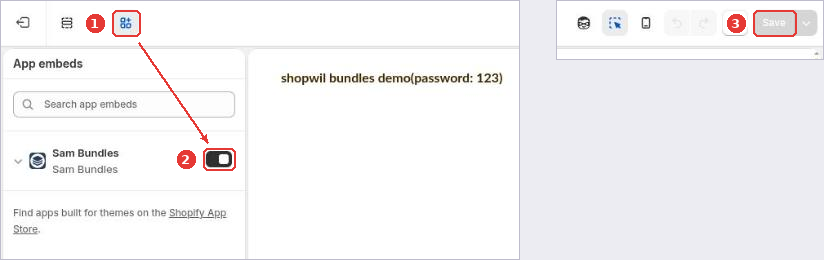
If you open the theme editor yourself (Online Store > Edit theme):
- Click the App embeds icon (1).
- Switch on Sam Bundles (2).
- Click Save (3).
Step 3: Check the status
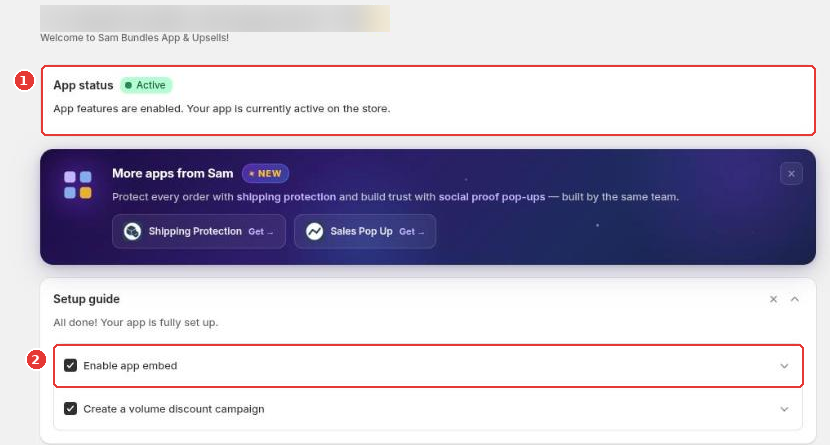
Back in the app, App status shows Active (1) and the setup guide ticks Enable app embed (2).
Place a widget yourself (optional)
The widget appears next to the product form automatically. To put it somewhere else, add the Volume Discount, Mix & Match, Bundle Builder or Fixed Bundle block to your product template in the theme editor (Add section > Apps).
Still need help?
Our developers answer support themselves. Chat with us or email [email protected].