

Sam Bundles guide · Offers
Set up a buy X, get Y (BOGO) offer
In short
Start from the Buy X, get Y template. Each bar sets how many items the customer buys and at what price, and how many they get with which discount, for example Buy 1, get 1 at 100% off. Choose the products, adjust the titles and badges, check the preview and save.
Buy X, get Y offers give free or discounted items when a customer buys a set number. Start from Create new offer > Buy X, get Y (BXGY) deal. The template comes with three bars: buy 1 get 1 free, buy 2 get 3 free and buy 3 get 6 free.
Products, Settings, Style, add-ons and Advanced work exactly as in quantity breaks. The difference is in the bars:
- Buy (1): how many items the customer pays for, and their price (usually full price).
- Get (2): how many items they receive, the price type and the discount per item. 100% off makes them free.
- The Preview (3) shows the price the customer pays and what they save.
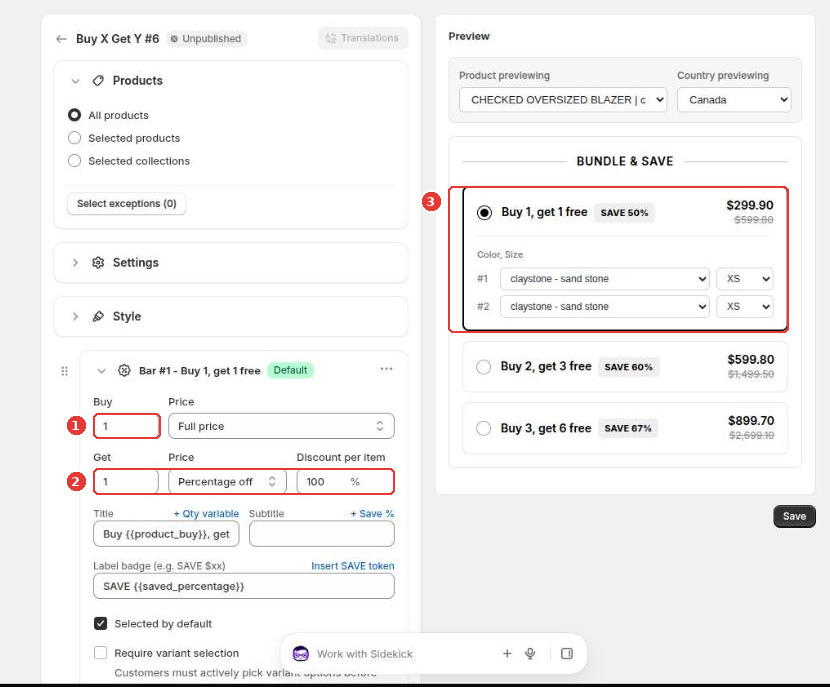
The title uses variables such as {{product_buy}}, and the badge can show SAVE {{saved_percentage}}. Click Save to publish.
Still need help?
Our developers answer support themselves. Chat with us or email [email protected].